
6.9 KiB
6.9 KiB
title, cover, categories, series, tags, abbrlink, summary, date
| title | cover | categories | series | tags | abbrlink | summary | date | ||
|---|---|---|---|---|---|---|---|---|---|
| OpenGL- Cohen-Sutherland 编码裁剪算法 | https://pic.biss.click/image/d1705811-324e-4378-a512-74d4baa651b7.png |
|
OpenGL | OpenGL | 9b2ef00a | 这篇文章介绍了Cohen-Sutherland编码裁剪算法,这是一种在计算机图形学中常用的图像裁剪方法。裁剪的目的是从一个大场景中提取所需信息,例如在浏览地图时放大显示特定区域。Cohen-Sutherland算法通过空间划分和编码方案来判断线段与矩形窗口的位置关系,从而决定线段的哪部分在窗口内、哪部分在窗口外。算法的核心在于计算线段端点的区域编码,并根据编码值来确定线段的裁剪结果。文章还提供了具体的代码实现,包括初始化设置、窗口大小调整和主函数等,展示了如何在实际应用中使用该算法进行图像裁剪。 | 2026-04-15 19:34:23 |

裁剪是从数据集合提取信息的过程,它是计算机图形学许多重要问题的基础。裁剪典型的用途就是从一个大的场景中提取所需的信息,以显示某一局部场景或视图。比如浏览地图时,对感兴趣的区域放大显示,此时窗口内显示的内容会相应减少。确定图形的哪些部分在窗口内,哪些部分在窗口外(不可见区域),只显示窗口内的那部分图形,这个选择处理过程就是裁剪。
Cohen-Sutherland编码裁剪算法 算法思想 1)若线段完全在窗口之内则显示该线段称为“取”, 2)若线段明显在窗口之外则丢弃该线段称为“弃” 3)若线段既不满足“取”的条件也不满足“弃”的条件则把线段分割为两段,对于完全在窗口之外的部分可弃之。
具体实现
为快速判断一条直线段与矩形窗口的位置关系采用如图所示的空间划分和编码方案(四位二进制编码上下右左)
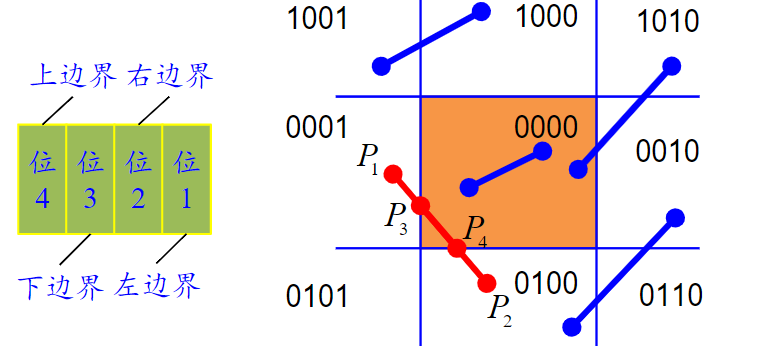
接下来是具体代码
#include <GL/glut.h>
#include <iostream>

// --- 定义区域编码 ---
#define INSIDE 0 // 0000
#define LEFT   1 // 0001
#define RIGHT  2 // 0010
#define BOTTOM 4 // 0100
#define TOP    8 // 1000

// --- 定义裁剪窗口结构 ---
struct ClipWindow {
    float xmin, xmax, ymin, ymax;
};

// --- 全局变量设置 ---
ClipWindow rect;
int x_0, y_0, x_1, y_1; // 线段端点

/**
 * 计算点 (x, y) 的区域编码
 */
int computeCode(float x, float y, ClipWindow rect) {
    int code = INSIDE;
    if (x < rect.xmin)      code |= LEFT;
    else if (x > rect.xmax) code |= RIGHT;
    if (y < rect.ymin)      code |= BOTTOM;
    else if (y > rect.ymax) code |= TOP;
    return code;
}

/**
 * Cohen-Sutherland 算法核心
 * 注意:这里传入坐标的引用,直接修改坐标值以得到裁剪后的结果
 */
void cohenSutherlandClip(float& x_0, float& y_0, float& x_1, float& y_1, ClipWindow rect) {
    int code1 = computeCode(x_0, y_0, rect);
    int code2 = computeCode(x_1, y_1, rect);
    bool accept = false;

    while (true) {
        // 如果两端点都在窗口内 (0000 | 0000 == 0)
        if (!(code1 | code2)) {
            accept = true;
            break;
        }
        // 如果两端点都在窗口的同一侧外部 (例如都在左边:0001 & 0001 != 0) 按位与运算
        else if (code1 & code2) {
            break; // 直接舍弃
        }
        // 3. 线段部分在窗口内,需要求交点
        else {
            int code_out;
            float x, y;

            // 选择窗口外的一个端点
            if (code1 != 0)
                code_out = code1;
            else
                code_out = code2;

            // 计算交点
            if (code_out & TOP) {
                x = x_0 + (x_1 - x_0) * (rect.ymax - y_0) / (y_1 - y_0);
                y = rect.ymax;
            }
            else if (code_out & BOTTOM) {
                x = x_0 + (x_1 - x_0) * (rect.ymin - y_0) / (y_1 - y_0);
                y = rect.ymin;
            }
            else if (code_out & RIGHT) {
                y = y_0 + (y_1 - y_0) * (rect.xmax - x_0) / (x_1 - x_0);
                x = rect.xmax;
            }
            else if (code_out & LEFT) {
                y = y_0 + (y_1 - y_0) * (rect.xmin - x_0) / (x_1 - x_0);
                x = rect.xmin;
            }

            // 用交点替换原来的外部端点
            if (code_out == code1) {
                x_0 = x; y_0 = y;
                code1 = computeCode(x_0, y_0, rect);
            }
            else {
                x_1 = x; y_1 = y;
                code2 = computeCode(x_1, y_1, rect);
            }
        }
    }

    // 如果接受,则绘制裁剪后的线段(蓝色)
    if (accept) {
        glBegin(GL_LINES);
        glColor3f(0.0f, 0.0f, 1.0f); // 蓝色
        glVertex2f(x_0, y_0);
        glVertex2f(x_1, y_1);
        glEnd();
    }
}

// --- 显示回调函数 ---
void myDisplay() {
    glClear(GL_COLOR_BUFFER_BIT);

    // 1. 绘制裁剪窗口 (红色线框)
    glColor3f(1.0f, 0.0f, 0.0f); // 红色
    glBegin(GL_LINE_LOOP);
        glVertex2f(rect.xmin, rect.ymin);
        glVertex2f(rect.xmax, rect.ymin);
        glVertex2f(rect.xmax, rect.ymax);
        glVertex2f(rect.xmin, rect.ymax);
    glEnd();

    // 2. 绘制原始线段 (绿色)
    // 注意:为了演示效果,我们在调用裁剪函数前,先保存原始坐标,
    // 或者在这里直接用初始值绘制。这里我们使用初始值绘制。
    int orig_x_0 = 50, orig_y_0 = 350;
    int orig_x_1 = 550, orig_y_1 = 50;

    glBegin(GL_LINES);
    glColor3f(0.0f, 1.0f, 0.0f); // 绿色
    glVertex2f(orig_x_0, orig_y_0);
    glVertex2f(orig_x_1, orig_y_1);
    glEnd();

    // 3. 执行裁剪并绘制结果 (蓝色)
    // 使用 float 变量传入,因为算法内部会修改它们
    float cx_0 = orig_x_0, cy_0 = orig_y_0;
    float cx_1 = orig_x_1, cy_1 = orig_y_1;

    // 加粗蓝色线条以便区分
    glLineWidth(3.0);
    cohenSutherlandClip(cx_0, cy_0, cx_1, cy_1, rect);
    glLineWidth(1.0); // 恢复线宽

    glFlush();
}

// --- 初始化设置 ---
void Init() {
    glShadeModel(GL_FLAT);

    rect.xmin = 100;
    rect.xmax = 400;
    rect.ymin = 100;
    rect.ymax = 300;
}

// --- 窗口大小调整 ---
void myReshape(int w, int h) {
    glViewport(0, 0, (GLsizei)w, (GLsizei)h);
    glMatrixMode(GL_PROJECTION);
    glLoadIdentity();
    // 设置二维投影范围,与坐标数值对应
    gluOrtho2D(0.0, (GLdouble)w, 0.0, (GLdouble)h);
    glMatrixMode(GL_MODELVIEW);
}

// --- 主函数 ---
int main(int argc, char* argv[]) {
    glutInit(&argc, argv);
    glutInitDisplayMode(GLUT_RGB | GLUT_SINGLE);
    glutInitWindowPosition(100, 100);
    glutInitWindowSize(600, 400);
    glutCreateWindow("实验2_03毕爽爽 Cohen-Sutherland 算法");

    Init();

    glutDisplayFunc(myDisplay);
    glutReshapeFunc(myReshape);

    glutMainLoop();
    return 0;
}