Bi's Blog 2026-02-26T10:12:31.845Z https://blog.biss.click/ biss Hexo 新年快乐! https://blog.biss.click/posts/5785bd01/ 2026-02-13T22:56:18.000Z 2026-02-26T10:12:31.845Z 各位亲朋好友、合作伙伴及屏幕前的你:

值此二〇二六年蛇年来临之际,为贯彻落实“快乐至上”的核心价值观,进一步提升全体人员的幸福指数,现将有关事项通知如下:

一、各单位要切实做好“吃好喝好”保障工作,严禁在假期期间进行任何形式的emo。

二、请各有关人员在收到本通知后,务必在下方留言区留下你的新年愿望,由后台系统统一收集并祝愿其实现。

三、祝大家在新的一年里,身体健康,万事如意,所得皆所愿,所行化坦途!

]]>
<p>各位亲朋好友、合作伙伴及屏幕前的你:</p> <p>值此二〇二六年蛇年来临之际,为贯彻落实“快乐至上”的核心价值观,进一步提升全体人员的幸福指数,现将有关事项通知如下:</p> <p>一、各单位要切实做好“吃好喝好”保障工作,严禁在假期期间进行任何形式的emo。</p> <
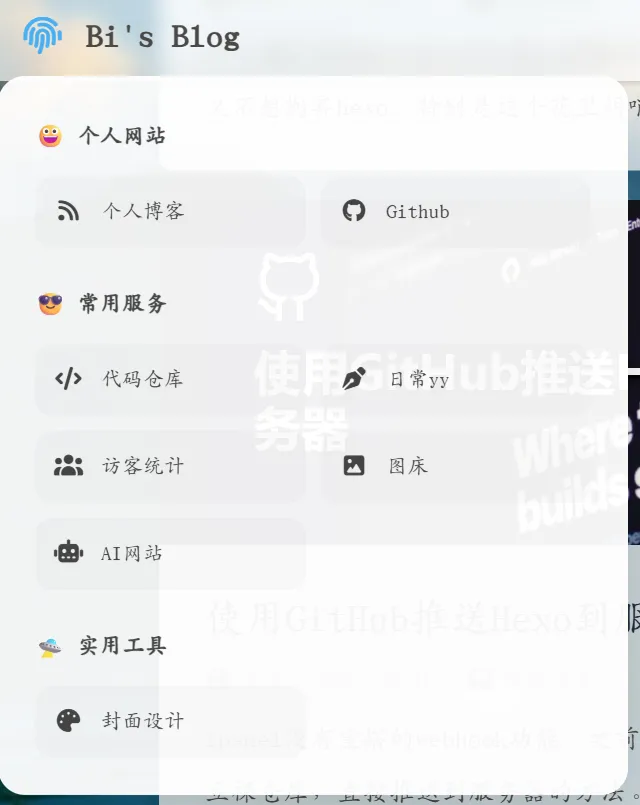
添加网站左上角菜单 https://blog.biss.click/posts/7e921903/ 2026-02-09T23:11:14.000Z 2026-02-26T10:12:31.845Z 看到柳神的网站有这种菜单,但是没有写魔改教程,只好自己慢慢摸索了。

预计做好后是这种效果:

示意图

首先,修改\themes\butterfly\layout\includes\header\nav.pug:

1
2
3
4
5
6
7
8
9
10
11
12
13
14
15
16
17
18
19
20
21
22
23
24
25
26
27
28
29
30
31
32
33
34
35
36
37
38
39
40
41
42
43
44
45
46
47
48
49
50
51
nav#nav
//- 左侧区域:包含指纹菜单和网站名
span#blog-info
#ls-menu-container
i.fas.fa-fingerprint
#ls-menu-panel
.ls-section
.ls-title 😀 个人网站
.ls-grid
a(href="/") #[i.fas.fa-rss] 个人博客
a(href="https://github.com/bishshi") #[i.fab.fa-github] Github
.ls-section
.ls-title 😎 常用服务
.ls-grid
a(href="https://git.biss.click/biss") #[i.fas.fa-code] 代码仓库
a(href="https://mm.biss.click") #[i.fas.fa-pen-nib] 日常yy
a(href="https://statstic.biss.click") #[i.fas.fa-users] 访客统计
a(href="https://pic.biss.click") #[i.fas.fa-image] 图床
a(href="https://chat.biss.click") #[i.fas.fa-robot] AI网站
.ls-section
.ls-title 🛸 实用工具
.ls-grid
a(href="https://cover.biss.click") #[i.fas.fa-palette] 封面设计

a.nav-site-title(href=url_for('/'))
if theme.nav.logo
img.site-icon(src=url_for(theme.nav.logo) alt='Logo')
if theme.nav.display_title
span.site-name=config.title

//- 中间区域:关键!必须在 nav 下一级,以便 JS 切换类名
if globalPageType === 'post' && theme.nav.display_post_title
a.nav-page-title(href='javascript:void(0);' onclick='btf.scrollToDest(0, 500)')
span.site-name=(page.title || config.title)

//- 右侧区域
#nav-right
if theme.menu
#menus
!= partial('includes/header/menu_item', {}, {cache: true})

if theme.search.use || true
#random-post-button
a.site-page.social-icon#random-post-link(href='javascript:void(0);' onclick='randomPost()')
i.fas.fa-solid.fa-shuffle
#search-button
a.site-page.social-icon.search-typesense-trigger
i.fas.fa-search.fa-fw
#toggle-menu
span.site-page
i.fas.fa-bars.fa-fw

在合适的目录下新建nav.css(例如\themes\butterfly\source\css\nav.css),这份css是磨砂玻璃的样式:

1
2
3
4
5
6
7
8
9
10
11
12
13
14
15
16
17
18
19
20
21
22
23
24
25
26
27
28
29
30
31
32
33
34
35
36
37
38
39
40
41
42
43
44
45
46
47
48
49
50
51
52
53
54
55
56
57
58
59
60
61
62
63
64
65
66
67
68
69
70
71
72
73
74
75
76
77
78
79
80
81
82
83
84
85
86
87
88
89
90
91
92
93
94
95
96
97
98
99
100
101
102
103
104
105
106
107
108
109
110
111
112
113
114
115
116
117
118
119
120
121
122
123
124
125
126
127
128
129
130
131
132
133
134
135
136
137
138
139
140
141
142
143
144
145
146
147
148
149
150
151
152
153
154
155
156
157
158
159
160
161
162
163
164
165
166
167
168
169
170
171
172
173
174
175
176
177
178
179
180
181
182
183
184
185
186
187
188
189
190
191
192
193
194
195
196
197
198
199
200
201
202
203
#nav-right{
flex:1 1 auto;
justify-content: flex-end;
margin-left: auto;
display: flex;
flex-wrap:nowrap;
}

/* 导航栏居中 */

#sidebar #sidebar-menus .menus_items .menus_item {
margin: 10px 0;
}
#sidebar #sidebar-menus .menus_items a.site-page {
padding-left: 0;
}
#sidebar #sidebar-menus .menus_items .site-page {
position: relative;
display: block;
padding: 6px 30px 6px 22px;
color: var(--font-color);
font-size: 1.15em;
border: var(--style-border-always);
background: var(--icat-card-bg);
font-size: 14px;
border-radius: 12px;
}
#sidebar #sidebar-menus .menus_items .site-page i:first-child {
text-align: left;
padding-left: 10px;
}

#nav #menus {
display: flex;
justify-content: center;
width: 100%;
position: absolute;
left: 0;
margin: 0;
transform: translateZ(0);
}
#nav #blog-info {
flex-wrap: nowrap;
display: flex;
align-items: center;
z-index: 102;
max-width: fit-content;
}
@media screen and (max-width: 900px) {
#nav {
padding: 0 15px;
}
#nav-group {
padding: 0 0.2rem;
}
#rightside {
right: -42px;
}
}
/* IPAD菜单栏调整 */

/* 1. 容器溢出穿透 */
#nav, #blog-info, #nav-group {
overflow: visible !important;
}

#ls-menu-container {
position: relative !important;
display: inline-flex !important;
align-items: center;
height: 100%;
padding: 0 15px;
cursor: pointer !important;
z-index: 2000 !important;
}

/* 2. 悬浮面板:宽大且高不透明度 */
#ls-menu-panel {
position: absolute !important;
top: 100% !important;
left: 0 !important;
margin-top: 15px !important;
width: 420px;
padding: 24px;
border-radius: 18px;

/* 高不透明度磨砂玻璃 (0.9) */
background: rgba(255, 255, 255, 0.95) !important;
backdrop-filter: blur(20px) saturate(180%) !important;
-webkit-backdrop-filter: blur(20px) saturate(180%) !important;

border: 1px solid rgba(255, 255, 255, 0.5) !important;
box-shadow: 0 20px 50px rgba(0, 0, 0, 0.18) !important;

opacity: 0 !important;
visibility: hidden !important;
transform: translateY(12px) !important;
transition: all 0.3s cubic-bezier(0.4, 0, 0.2, 1) !important;
z-index: 999999 !important;
cursor: default;
}

/* 3. 透明感应桥梁 */
#ls-menu-panel::before {
content: "";
position: absolute;
top: -20px;
left: 0;
right: 0;
height: 25px;
background: transparent !important;
}

/* 4. 触发效果 */
#ls-menu-container:hover #ls-menu-panel {
opacity: 1 !important;
visibility: visible !important;
transform: translateY(0) !important;
}

#ls-menu-container:hover i.fa-fingerprint {
color: #49b1f5;
transform: scale(1.1);
}

/* 5. 内部网格:保持两列 */
.ls-section { margin-bottom: 22px; }
.ls-section:last-child { margin-bottom: 0; }
.ls-title {
color: #333;
font-weight: 800;
font-size: 15px;
margin-bottom: 12px;
opacity: 0.9;
}

.ls-grid {
display: grid !important;
grid-template-columns: repeat(2, 1fr); /* 恢复为两列 */
gap: 10px;
}

.ls-grid a {
color: #444 !important;
font-size: 14px !important;
padding: 10px 12px;
border-radius: 12px;
display: flex;
align-items: center;
transition: all 0.2s ease;
background: rgba(0, 0, 0, 0.02);
}

.ls-grid a:hover {
background: #49b1f5 !important;
color: #fff !important;
transform: translateX(4px); /* 悬停时轻微右移,增加动感 */
}

.ls-grid a i {
margin-right: 12px;
width: 20px;
text-align: center;
font-size: 15px;
}

/* 6. 深色模式适配 */
[data-theme='dark'] #ls-menu-panel {
background: rgba(30, 30, 30, 0.95) !important;
border-color: rgba(255, 255, 255, 0.1) !important;
}
[data-theme='dark'] .ls-title { color: #eee; }
[data-theme='dark'] .ls-grid a {
color: #ccc !important;
background: rgba(255, 255, 255, 0.05);
}

#nav.show-title .nav-page-title {
display: flex !important;
opacity: 1 !important;
visibility: visible !important;
position: absolute !important;
left: 50% !important;
transform: translateX(-50%) !important;
white-space: nowrap !important;
z-index: 1000 !important;
}

#nav.show-title #menus,
#nav.show-title .nav-site-title {
opacity: 0 !important;
visibility: hidden !important;
pointer-events: none !important;
}

#nav .nav-page-title {
display: none;
transition: opacity 0.3s ease;
}

#nav #blog-info {
overflow: visible !important;
}

然后在_config.butterfly.yml里面引用该css

1
- <link rel="stylesheet" href="/css/nav.css">

然后重新构建应该就可以看到效果了。

]]>
<p>看到柳神的网站有这种菜单,但是没有写魔改教程,只好自己慢慢摸索了。</p> <div class='liushen-tag-link'><a class="tag-Link" target="_blank"
将博客仓库转移到gitea https://blog.biss.click/posts/d2c8521/ 2026-02-07T04:30:39.000Z 2026-02-26T10:12:31.845Z 在上一篇文章中已经完成了gitea的安装
那么博客源码迁移倒是没问题,直接git remote add origin就行,但是action文件就有些变更。
这是我修改的action文件:

1
2
3
4
5
6
7
8
9
10
11
12
13
14
15
16
17
18
19
20
21
22
23
24
25
26
27
28
29
30
31
32
33
34
35
36
37
38
39
40
41
42
43
44
45
46
47
48
49
50
51
52
53
54
55
56
name: 自动部署
on:
push:
branches:
- master
release:
types:
- published
workflow_dispatch:
env:
TZ: Asia/Shanghai
jobs:
deploy:
runs-on: ubuntu-latest
steps:
- name: 检查分支
uses: actions/checkout@v4
with:
ref: master
- name: 缓存项目 npm
id: cache-node-modules
uses: actions/cache@v3
with:
path: node_modules
key: ${{ runner.os }}-nodeModules-${{ hashFiles('package-lock.json') }}-${{ hashFiles('package.json') }}
restore-keys: |
${{ runner.os }}-nodeModules-
- name: 安装 Node
uses: actions/setup-node@v4
with:
node-version: "22.x"
- name: 安装 Hexo
run: |
npm install hexo-cli --global
- name: 安装依赖
if: steps.cache-node-modules.outputs.cache-hit != 'true'
run: |
npm install
- name: 清理文件树
run: |
npm run clean
- name: 生成静态文件并压缩
run: |
npm run build
- name: 部署
run: |
cd ./public
git init
git config user.name "${{ gitea.actor }}"
git config user.email "${{ gitea.actor }}@noreply.gitea.io"
git add .
git commit -m "${{ gitea.event.head_commit.message }}··[$(date +"%Z %Y-%m-%d %A %H:%M:%S")]"
git push --force --quiet "https://${{ gitea.actor }}:${{ secrets.DEPLOY_TOKEN }}@git.biss.click/biss/blog.git" master:page
- name: Deploy to Server
run: |
curl -k -X POST

仅供参考吧,最后面是webhook,可以自己改改。

]]>
<p>在上一篇文章中已经完成了gitea的安装<br>那么博客源码迁移倒是没问题,直接<code>git remote add origin</code>就行,但是action文件就有些变更。<br>这是我修改的action文件:</p> <figure
安装gitea https://blog.biss.click/posts/34725d47/ 2026-02-06T22:32:04.000Z 2026-02-26T10:12:31.845Z 今天想把网站的源码转移到自建git仓,所以先来安装gitea吧(gitlab过于庞大,服务器配置不够)
PS:我的服务器为2C2G

安装gitea

这里用二进制文件安装

获取二进制文件:

1
2
3
wget -O gitea https://dl.gitea.com/gitea/1.25.4/gitea-1.25.4-linux-amd64
chmod +x gitea
cp gitea /usr/local/bin/gitea

创建用户

这一步不是必须的,但是推荐这样,用root用户很容易出问题。

1
2
3
4
5
6
7
8
9
10
11
12
13
14
15
16
17
18
19
20
# On Ubuntu/Debian:
adduser \
--system \
--shell /bin/bash \
--gecos 'Git Version Control' \
--group \
--disabled-password \
--home /home/git \
git

# On Fedora/RHEL/CentOS:
groupadd --system git
adduser \
--system \
--shell /bin/bash \
--comment 'Git Version Control' \
--gid git \
--home-dir /home/git \
--create-home \
git

创建工作目录

1
2
3
4
5
6
7
8
mkdir -p /var/lib/gitea/{custom,data,log}
chown -R git:git /var/lib/gitea/
chmod -R 750 /var/lib/gitea/
mkdir /etc/gitea
chown root:git /etc/gitea
chmod 770 /etc/gitea
chmod 750 /etc/gitea
chmod 640 /etc/gitea/app.ini

创建系统服务

直接把github上面的挪过来就可以

然后注册服务并启动

1
2
sudo systemctl enable gitea
sudo systemctl start gitea

创建数据库

可以用MySQL数据库或者PostgreSQL,创建一个数据库在web页面填写进去就行。

反向代理略过,和普通网站的反向代理配置没有什么区别。

安装runner

这个runner也不是必须的,是为了实现github的action功能;在2C2G服务器上我看运行的还可以,当然,只是这个hexo博客的自动构建,占用资源也少;
使用doker,这也是官方建议。以下是compose文件:

1
2
3
4
5
6
7
8
9
10
11
12
13
14
15

services:
runner:
image: gitea/act_runner:latest
ports:
- 8088:8088
environment:
- CONFIG_FILE=/config.yaml
- GITEA_INSTANCE_URL=https://git.biss.click
- GITEA_RUNNER_REGISTRATION_TOKEN= #替换成自己的token
volumes:
- ./config.yaml:/config.yaml
- ./data:/data
- /var/run/docker.sock:/var/run/docker.sock # 允许 Runner 调用宿主机 Docker

token在管理后台 工作流-运行器-新建运行器获取
config文件需要这样生成

1
docker run --entrypoint="" --rm -it docker.io/gitea/act_runner:latest act_runner generate-config > config.yaml

在后台工作流运行器可以看见就没问题了。

]]>
<p>今天想把网站的源码转移到自建git仓,所以先来安装gitea吧(gitlab过于庞大,服务器配置不够)<br>PS:我的服务器为2C2G</p> <h1 id="安装gitea"><a href="#安装gitea" class="headerlink"
添加typesense搜索 https://blog.biss.click/posts/f287c563/ 2026-02-05T05:14:16.000Z 2026-02-26T10:12:31.845Z 最近在构建班级博客,用ghost cms,在构建搜索时发现了typesense,所以把他移植到这个博客上。

安装typesense

直接用docker-compose:

1
2
3
4
5
6
7
8
9
10
11

services:
typesense:
image: typesense/typesense:30.1
restart: always
ports:
- "8108:8108"
volumes:
- ./typesense-data:/data
command: '--data-dir /data --api-key=填写key --enable-cors'

然后就是反向代理之类的,不过多写了。

添加数据集

1
2
3
# 先安装库
npm install hexo-generator-search
npm install typesense xml2js

然后在config.yml配置(就是把文章生成json):

1
2
3
4
search:
path: search.json
field: post
content: true

创建一个数据同步脚本sync_typesense.js:

1
2
3
4
5
6
7
8
9
10
11
12
13
14
15
16
17
18
19
20
21
22
23
24
25
26
27
28
29
30
31
32
33
34
35
36
37
38
39
40
41
42
43
44
45
46
47
48
49
50
51
52
53
54
55
56
57
58
59
60
61
62
63
64
65
66
67
68
const Typesense = require('typesense');
const fs = require('fs');
const xml2js = require('xml2js');

// --- 配置区域 ---
const CONFIG = {
apiKey: '你的Admin-API-Key', // 必须是 Admin Key
host: '你的Typesense主机地址',
port: 443,
protocol: 'https',
collectionName: 'blogs'
};

const client = new Typesense.Client({
'nodes': [{ 'host': CONFIG.host, 'port': CONFIG.port, 'protocol': CONFIG.protocol }],
'apiKey': CONFIG.apiKey,
'connectionTimeoutSeconds': 5
});

async function sync() {
try {
// 1. 读取并解析 XML
const xml = fs.readFileSync('./public/search.xml', 'utf8');
const parser = new xml2js.Parser({ explicitArray: false });
const result = await parser.parseStringPromise(xml);

// 提取文章列表 (处理单篇文章和多篇文章的情况)
let entries = result.search.entry;
if (!Array.isArray(entries)) entries = [entries];

// 格式化数据以适配 Typesense
const documents = entries.map(post => ({
title: post.title,
url: post.url,
content: post.content,
categories: post.categories ? (Array.isArray(post.categories.category) ? post.categories.category : [post.categories.category]) : [],
tags: post.tags ? (Array.isArray(post.tags.tag) ? post.tags.tag : [post.tags.tag]) : [],
}));

// 2. 检查或创建 Collection (Schema)
try {
await client.collections(CONFIG.collectionName).retrieve();
} catch (err) {
const schema = {
name: CONFIG.collectionName,
fields: [
{ name: 'title', type: 'string', locale: 'zh'},
{ name: 'content', type: 'string', locale: 'zh'},
{ name: 'url', type: 'string' },
{ name: 'categories', type: 'string[]', facet: true },
{ name: 'tags', type: 'string[]', facet: true }
]
};
await client.collections().create(schema);
console.log('Collection created!');
}

// 3. 导入数据 (使用 upsert 模式:存在则更新,不存在则创建)
console.log(`Syncing ${documents.length} posts to Typesense...`);
await client.collections(CONFIG.collectionName).documents().import(documents, { action: 'upsert' });
console.log('Sync complete!');

} catch (error) {
console.error('Sync failed:', error);
}
}

sync();

然后运行node sync_typesense.js

创建只读key

把下面代码存储成js,node运行就行。

1
2
3
4
5
6
7
8
9
10
11
12
13
14
15
16
17
18
19
20
21
22
23
24
25
26
27
const http = require('https');

const data = JSON.stringify({
"description": "Public search only key",
"actions": ["documents:search"],
"collections": ["blogs"]
});

const options = {
hostname: '', // 不要带 https://
port: 443,
path: '/keys',
method: 'POST',
headers: {
'X-TYPESENSE-API-KEY': '你的admin key',
'Content-Type': 'application/json',
'Content-Length': data.length
}
};

const req = http.request(options, res => {
res.on('data', d => { process.stdout.write(d); });
});

req.on('error', error => { console.error(error); });
req.write(data);
req.end();

博客添加搜索

config.yamlinject bottom添加:

1
2
- <script src="https://cdn.jsdmirror.com/npm/instantsearch.js@4.56.0"></script>
- <script src="https://cdn.jsdmirror.com/npm/typesense-instantsearch-adapter@2.7.0/dist/typesense-instantsearch-adapter.min.js"></script>

为了方便,我直接修改了\themes\butterfly\source\js\search\local_search.js

1
2
3
4
5
6
7
8
9
10
11
12
13
14
15
16
17
18
19
20
21
22
23
24
25
26
27
28
29
30
31
32
33
34
35
36
37
38
39
40
41
42
43
44
45
46
47
48
49
50
51
52
53
54
55
56
57
58
59
60
61
62
63
64
65
66
67
68
69
70
71
72
73
74
75
76
77
78
79
80
81
82
83
84
85
86
87
88
89
90
91
92
93
94
95
96
97
98
99
100
101
102
103
104
105
106
107
108
109
110
111
112
113
114
115
116
117
118
119
120
121
122
123
124
125
126
127
128
129
130
131
132
133
134
135
136
137
138
139
140
141
142
143
144
145
146
147
148
149
150
151
152
153
154
155
156
157
158
159
160
161
162
163
164
165
166
167
168
169
170
171
172
173
174
175
176
177
178
179
180
181
182
183
184
185
186
187
188
189
190
191
192
193
194
195
196
197
198
199
200
201
202
203
204
205
206
207
208
209
210
211
212
213
214
215
216
217
218
219
220
221
222
223
224
225
226
227
228
229
230
231
232
233
234
235
236
237
238
239
240
241
242
243
244
245
246
247
248
249
250
251
252
253
254
255
256
257
258
259
260
261
262
263
264
265
266
267
268
269
270
271
272
273
274
275
276
277
278
279
280
281
282
283
284
285
286
287
288
289
290
291
292
293
294
295
296
297
298
299
300
301
302
303
304
305
306
307
308
309
310
311
312
313
314
315
316
317
318
319
320
321
322
323
324
325
326
327
328
329
330
331
332
333
334
335
336
337
338
339
340
341
342
343
344
345
346
347
348
349
350
351
352
353
354
355
356
357
358
359
360
361
362
363
364
365
366
367
368
369
370
371
372
373
374
375
376
377
378
379
380
381
382
383
384
385
386
387
388
389
390
391
392
393
394
395
396
397
398
399
400
401
402
403
404
405
406
407
408
409
410
411
412
413
414
415
416
417
418
419
420
421
422
423
424
425
426
427
428
429
430
431
432
433
434
435
436
437
438
439
440
441
442
443
444
445
446
447
448
449
450
451
452
453
454
455
456
457
458
459
460
461
462
463
464
465
466
467
468
469
470
471
472
473
474
475
476
477
478
479
480
481
482
483
484
485
486
487
488
489
490
491
492
493
494
495
496
497
498
499
500
501
502
503
504
505
506
507
508
509
510
511
512
513
514
515
516
517
518
519
520
521
522
523
524
525
526
527
528
529
530
531
532
533
534
535
536
537
538
539
540
541
542
543
544
545
(function () {
'use strict';

// ============================================================================
// 配置区域 - 请根据实际情况修改
// ============================================================================
const CONFIG = {
apiKey: "", // ⚠️ 建议使用 Search-Only API Key
server: {
host: "host",
port: "443",
protocol: "https"
},
indexName: "blogs",
searchParams: {
query_by: "title,content",
highlight_full_fields: "title,content",
per_page: 8,
num_typos: 1,
typo_tokens_threshold: 1,
prefix: true
},
ui: {
maxRetries: 10,
retryDelay: 100,
animationDuration: 300
}
};

// ============================================================================
// 状态管理
// ============================================================================
let searchInstance = null;
let isInitialized = false;
let isSearchOpen = false;
let initRetryCount = 0;
const MAX_INIT_RETRIES = 30; // 最多重试30次 (3秒)

// ============================================================================
// 错误提示函数
// ============================================================================
function showErrorMessage() {
const hitsContainer = document.getElementById('hits');
if (!hitsContainer) return;

hitsContainer.innerHTML =
'<div class="ts-empty">' +
'<div style="color: #f44336;"><i class="fas fa-exclamation-triangle" style="font-size: 3rem;"></i></div>' +
'<div style="font-size: 1.1rem; font-weight: bold; margin: 15px 0;">搜索服务加载失败</div>' +
'<div style="font-size: 0.9rem; color: #666; line-height: 1.8;">' +
'<p>依赖库未能正确加载,请检查以下配置:</p>' +
'<ol style="text-align: left; max-width: 500px; margin: 15px auto;">' +
'<li>确认已在 <code>_config.butterfly.yml</code> 中正确引入依赖</li>' +
'<li>检查 JS 文件加载顺序(先 instantsearch.js,再 adapter)</li>' +
'<li>尝试更换 CDN 或使用本地文件</li>' +
'<li>打开浏览器控制台查看详细错误信息</li>' +
'</ol>' +
'</div>' +
'<div style="margin-top: 20px;">' +
'<button onclick="location.reload()" style="padding: 10px 20px; background: #49b1f5; color: white; border: none; border-radius: 5px; cursor: pointer;">重新加载页面</button>' +
'</div>' +
'</div>';
}

// ============================================================================
// 1. 动态插入 HTML 结构
// ============================================================================
const searchHTML = `
<div id="typesense-search-mask" class="ts-mask" style="display:none;">
<div id="typesense-search-container" class="ts-container">
<div class="ts-header">
<span class="ts-title">
<i class="fas fa-search"></i> 本站搜索
</span>
<span id="close-typesense" class="ts-close" aria-label="关闭搜索">&times;</span>
</div>
<div id="searchbox"></div>
<div id="stats" class="ts-stats"></div>
<div id="hits" class="ts-hits"></div>
<div id="pagination" class="ts-pagination"></div>
<div class="ts-footer">
<small>Search powered by <strong>Typesense</strong></small>
</div>
</div>
</div>

<style>
.ts-mask {
position: fixed;
top: 0;
left: 0;
width: 100%;
height: 100%;
background: rgba(0, 0, 0, 0.7);
z-index: 10000;
backdrop-filter: blur(5px);
-webkit-backdrop-filter: blur(5px);
opacity: 0;
transition: opacity 300ms ease;
}
.ts-mask.active { opacity: 1; }
.ts-container {
margin: 5% auto;
width: 90%;
max-width: 650px;
background: var(--search-bg, var(--card-bg, #fff));
padding: 25px;
border-radius: 12px;
box-shadow: 0 15px 35px rgba(0, 0, 0, 0.3);
position: relative;
z-index: 10001;
transform: translateY(-50px);
opacity: 0;
transition: all 300ms ease;
}
.ts-mask.active .ts-container {
transform: translateY(0);
opacity: 1;
}
.ts-header {
display: flex;
justify-content: space-between;
align-items: center;
margin-bottom: 20px;
border-bottom: 2px solid var(--text-highlight-color, #49b1f5);
padding-bottom: 10px;
}
.ts-title {
font-size: 1.2rem;
font-weight: bold;
color: var(--text-highlight-color, #49b1f5);
}
.ts-close {
cursor: pointer;
font-size: 28px;
color: var(--font-color, #333);
line-height: 1;
transition: color 0.2s, transform 0.2s;
}
.ts-close:hover {
color: var(--text-highlight-color, #49b1f5);
transform: scale(1.1);
}
.ais-SearchBox-input {
position: relative;
z-index: 10002;
cursor: text;
padding: 12px 40px 12px 15px !important;
border-radius: 8px !important;
border: 2px solid #eee !important;
width: 100%;
outline: none;
transition: border-color 0.3s, box-shadow 0.3s;
background: var(--card-bg, #fff);
color: var(--font-color, #333);
font-size: 1rem;
}
.ais-SearchBox-input:focus {
border-color: var(--text-highlight-color, #49b1f5) !important;
box-shadow: 0 0 0 3px rgba(73, 177, 245, 0.1);
}
.ts-stats {
margin: 10px 0;
font-size: 0.85rem;
color: var(--font-color, #666);
opacity: 0.8;
}
.ts-hits {
max-height: 55vh;
overflow-y: auto;
margin-top: 15px;
padding-right: 5px;
}
.ts-hits::-webkit-scrollbar { width: 6px; }
.ts-hits::-webkit-scrollbar-track {
background: var(--card-bg, #f1f1f1);
border-radius: 10px;
}
.ts-hits::-webkit-scrollbar-thumb {
background: var(--text-highlight-color, #49b1f5);
border-radius: 10px;
}
.ts-empty {
text-align: center;
padding: 40px 20px;
color: var(--font-color, #999);
}
.ts-empty i {
font-size: 3rem;
margin-bottom: 15px;
opacity: 0.3;
}
.ts-empty code {
background: #f5f5f5;
padding: 2px 6px;
border-radius: 3px;
font-family: monospace;
color: #e91e63;
}
.ts-empty ol {
padding-left: 20px;
}
.ts-empty li {
margin: 8px 0;
}
.ts-result-item {
border-radius: 8px;
transition: all 0.2s ease;
margin-bottom: 10px;
padding: 15px;
border: 1px solid transparent;
text-decoration: none;
display: block;
background: var(--card-bg, #fff);
}
.ts-result-item:hover {
background: var(--text-bg-hover, rgba(73, 177, 245, 0.05));
border-color: var(--text-highlight-color, #49b1f5);
transform: translateX(5px);
box-shadow: 0 2px 8px rgba(0, 0, 0, 0.1);
}
.ts-result-title {
font-weight: bold;
color: var(--text-highlight-color, #49b1f5);
font-size: 1.1rem;
margin-bottom: 8px;
display: block;
line-height: 1.4;
}
.ts-result-content {
font-size: 0.9rem;
color: var(--font-color, #666);
line-height: 1.6;
opacity: 0.85;
display: -webkit-box;
-webkit-line-clamp: 2;
-webkit-box-orient: vertical;
overflow: hidden;
}
.ts-result-item mark {
background: #ffeb3b;
color: #000;
padding: 2px 4px;
border-radius: 3px;
font-weight: 500;
}
.ts-pagination {
margin-top: 20px;
display: flex;
justify-content: center;
gap: 5px;
}
.ais-Pagination-list {
display: flex;
list-style: none;
padding: 0;
margin: 0;
gap: 5px;
}
.ais-Pagination-link {
display: block;
padding: 8px 12px;
border: 1px solid #ddd;
border-radius: 5px;
color: var(--font-color, #333);
text-decoration: none;
transition: all 0.2s;
background: var(--card-bg, #fff);
}
.ais-Pagination-link:hover {
background: var(--text-highlight-color, #49b1f5);
color: #fff;
}
.ais-Pagination-item--selected .ais-Pagination-link {
background: var(--text-highlight-color, #49b1f5);
color: #fff;
}
.ts-footer {
text-align: right;
margin-top: 15px;
border-top: 1px solid var(--border-color, #eee);
padding-top: 10px;
}
@media (max-width: 768px) {
.ts-container {
margin: 10px;
width: calc(100% - 20px);
padding: 20px 15px;
}
.ts-hits { max-height: 50vh; }
}
[data-theme="dark"] .ts-mask,
.dark-mode .ts-mask {
background: rgba(0, 0, 0, 0.85);
}
</style>
`;

document.body.insertAdjacentHTML('beforeend', searchHTML);

const mask = document.getElementById('typesense-search-mask');
const closeBtn = document.getElementById('close-typesense');
const container = document.getElementById('typesense-search-container');

// ============================================================================
// 搜索控制
// ============================================================================
function openSearch() {
if (isSearchOpen) return;
isSearchOpen = true;
mask.style.display = 'block';
void mask.offsetWidth;
mask.classList.add('active');
document.body.style.overflow = 'hidden';

if (!isInitialized) {
initTypesense();
}
focusSearchInput();
}

function closeSearch() {
if (!isSearchOpen) return;
isSearchOpen = false;
mask.classList.remove('active');
setTimeout(function() {
mask.style.display = 'none';
document.body.style.overflow = '';
}, CONFIG.ui.animationDuration);
}

function focusSearchInput(retryCount) {
retryCount = retryCount || 0;
const input = document.querySelector('.ais-SearchBox-input');
if (input) {
input.focus();
input.select();
} else if (retryCount < CONFIG.ui.maxRetries) {
setTimeout(function() {
focusSearchInput(retryCount + 1);
}, CONFIG.ui.retryDelay);
}
}

// ============================================================================
// 事件监听
// ============================================================================
document.addEventListener('click', function(e) {
if (e.target.closest('.search-typesense-trigger')) {
e.preventDefault();
openSearch();
}
});

closeBtn.addEventListener('click', closeSearch);
mask.addEventListener('click', function(e) {
if (e.target === mask) closeSearch();
});
container.addEventListener('click', function(e) {
e.stopPropagation();
});
window.addEventListener('keydown', function(e) {
if (e.key === 'Escape' && isSearchOpen) {
closeSearch();
}
if ((e.ctrlKey || e.metaKey) && e.key === 'k') {
e.preventDefault();
openSearch();
}
});

// ============================================================================
// Typesense 初始化(带重试限制)
// ============================================================================
function initTypesense() {
if (isInitialized || searchInstance) {
console.warn('Typesense 搜索已初始化');
return;
}

var instantsearchLoaded = typeof instantsearch !== 'undefined';
var adapterLoaded = typeof TypesenseInstantSearchAdapter !== 'undefined' ||
typeof window.TypesenseInstantSearchAdapter !== 'undefined';

console.log('📦 依赖库检查 (' + (initRetryCount + 1) + '/' + MAX_INIT_RETRIES + '):');
console.log(' instantsearch.js:', instantsearchLoaded ? '✅ 已加载' : '❌ 未加载');
console.log(' TypesenseAdapter:', adapterLoaded ? '✅ 已加载' : '❌ 未加载');

if (!instantsearchLoaded || !adapterLoaded) {
initRetryCount++;

if (initRetryCount >= MAX_INIT_RETRIES) {
console.error('');
console.error('❌ Typesense 依赖库加载失败!');
console.error('━━━━━━━━━━━━━━━━━━━━━━━━━━━━━━━━━━━━━━━━');
console.error('');
console.error('🔧 请检查 _config.butterfly.yml 配置:');
console.error('');
console.error('inject:');
console.error(' bottom: # ⚠️ 使用 bottom 而不是 head');
console.error(' - <script src="https://cdn.jsdelivr.net/npm/instantsearch.js@4.56.0"></script>');
console.error(' - <script src="https://cdn.jsdelivr.net/npm/typesense-instantsearch-adapter@2.7.0/dist/typesense-instantsearch-adapter.min.js"></script>');
console.error(' - <script src="/js/typesense-search-fixed.js"></script>');
console.error('');
console.error('💡 或在控制台手动检查:');
console.error(' typeof instantsearch');
console.error(' typeof TypesenseInstantSearchAdapter');
console.error('');
console.error('━━━━━━━━━━━━━━━━━━━━━━━━━━━━━━━━━━━━━━━━');

showErrorMessage();
return;
}

console.warn('⏳ 100ms 后重试...');
setTimeout(initTypesense, 100);
return;
}

initRetryCount = 0;
console.log('🚀 开始初始化 Typesense...');

try {
const typesenseAdapter = new TypesenseInstantSearchAdapter({
server: {
apiKey: CONFIG.apiKey,
nodes: [{
host: CONFIG.server.host,
port: CONFIG.server.port,
protocol: CONFIG.server.protocol
}],
cacheSearchResultsForSeconds: 120
},
additionalSearchParameters: CONFIG.searchParams
});

searchInstance = instantsearch({
searchClient: typesenseAdapter.searchClient,
indexName: CONFIG.indexName,
routing: false
});

searchInstance.addWidgets([
instantsearch.widgets.searchBox({
container: '#searchbox',
placeholder: '输入关键词寻找故事...',
autofocus: true,
showReset: true,
showSubmit: false,
showLoadingIndicator: true
}),
instantsearch.widgets.stats({
container: '#stats',
templates: {
text: function(data) {
if (!data.query) return '';
return '找到 <strong>' + data.nbHits + '</strong> 条结果 (' + data.processingTimeMS + 'ms)';
}
}
}),
instantsearch.widgets.hits({
container: '#hits',
templates: {
empty: function(results) {
return '<div class="ts-empty">' +
'<div><i class="fas fa-search"></i></div>' +
'<div>找不到与 "<strong>' + results.query + '</strong>" 相关的内容</div>' +
'<div style="margin-top: 10px;">试试其他关键词吧 (´·ω·`)</div>' +
'</div>';
},
item: function(hit) {
// 使用 _highlightResult 获取高亮文本
var titleHighlight = hit._highlightResult && hit._highlightResult.title
? hit._highlightResult.title.value
: (hit.title || '');

var contentHighlight = hit._highlightResult && hit._highlightResult.content
? hit._highlightResult.content.value
: (hit.content || '');

// 截取内容长度
if (contentHighlight.length > 200) {
contentHighlight = contentHighlight.substring(0, 200) + '...';
}

return '<a href="' + hit.url + '" class="ts-result-item">' +
'<div class="ts-result-title">' + titleHighlight + '</div>' +
'<div class="ts-result-content">' + contentHighlight + '</div>' +
'</a>';
}
}
}),
instantsearch.widgets.pagination({
container: '#pagination',
padding: 2,
showFirst: false,
showLast: false
})
]);

searchInstance.start();
isInitialized = true;

console.log('✅ Typesense 初始化成功!');

searchInstance.on('render', function() {
if (isSearchOpen) {
const input = document.querySelector('.ais-SearchBox-input');
if (input && document.activeElement !== input) {
input.focus();
}
}
});

} catch (error) {
console.error('❌ 初始化失败:', error);
showErrorMessage();
}
}

// ============================================================================
// 初始化
// ============================================================================
function init() {
console.log('🔍 Typesense 搜索已准备就绪');
console.log('💡 快捷键: Ctrl/Cmd + K');
}

if (document.readyState === 'loading') {
document.addEventListener('DOMContentLoaded', init);
} else {
init();
}

// ============================================================================
// 全局接口
// ============================================================================
window.TypesenseSearch = {
open: openSearch,
close: closeSearch,
isOpen: function() { return isSearchOpen; },
getInstance: function() { return searchInstance; }
};

})();

注意

indexName: “blogs” 和 collectionName: ‘posts’ 要一致!!!

]]>
<p>最近在构建班级博客,用<code>ghost cms</code>,在构建搜索时发现了typesense,所以把他移植到这个博客上。</p> <h1 id="安装typesense"><a href="#安装typesense" class="headerlink"
自定义字体 https://blog.biss.click/posts/b5601a7e/ 2026-01-15T23:47:15.000Z 2026-02-26T10:12:31.845Z 今天感觉网站的字体有些不好看,想换一下,搜索发现网站用woff或者woff2字体,在手机端和电脑都能完美显示

2026年2月3日更新:好像谷歌字体库可以在大陆直连了,速度也很快,所以这篇文章好像没什么必要了。

选择字体

首先在网上查找自己喜欢的字体,这里有一个网站

找到一个自己喜欢的,如果有woff或者woff2格式下载下载保存。没有也没关系,转换网站:

利用这个网站把下载的ttf字体文件转换成woff2格式。

添加字体

新建一个css文件

1
2
3
4
5
@font-face {
font-family: 'CascadiaCodePL';
font-display: swap;
src: url('/butterflyChange/fonts/font.woff2') format("woff2");
}

其中 font.woff2改成自己的文件名。
其他字体格式参考

1
2
3
4
5
6
7
8
9
10
11
12
13
@font-face {
font-family: 'webfont';
font-display: swap;
src: url('.eot'); /*IE9*/
src: url('.eot') format('embedded-opentype'), /* IE6-IE8 */
url('.woff2') format('woff2'),
url('.woff') format('woff'), /*chrome、firefox */
url('.ttf') format('truetype'), /* chrome、firefox、opera、Safari, Android, iOS 4.2+*/
url('.svg') format('svg'); /* iOS 4.1- */
}```
然后在`_config.butterfly.yml`里面引用这个css
```yml
- <link rel="stylesheet" href="/css/font.css">

在主题文件的font配置区域修改字体:

1
2
3
4
5
font:
global_font_size: 110%
code_font_size: 100%
font_family: # ,全局字体,不带后缀名
code_font_family: # 这是代码使用的字体

参考链接

]]>
<p>今天感觉网站的字体有些不好看,想换一下,搜索发现网站用woff或者woff2字体,在手机端和电脑都能完美显示</p> <div class="note no-icon
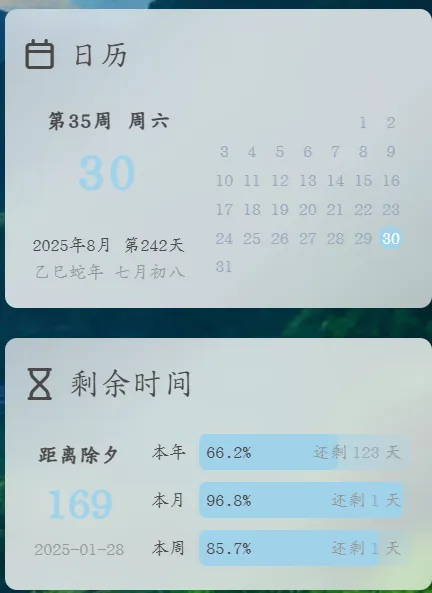
在侧边栏添加日历和倒计时 https://blog.biss.click/posts/5ed2f1e6/ 2026-01-15T23:47:07.000Z 2026-02-26T10:12:31.845Z 突然看到某个网站侧边栏有日历和倒计时,就研究了一下,抄下来了(🤭)
效果图:

效果图

添加js

1
2
3
4
5
6
7
8
9
10
11
12
13
14
15
16
17
18
19
20
21
22
23
24
25
26
27
28
29
30
31
32
33
34
35
36
37
38
39
40
41
42
43
44
45
46
47
48
49
50
51
52
53
54
55
56
57
58
59
60
61
62
63
64
65
66
67
68
69
70
71
72
73
74
75
76
77
78
79
80
81
82
83
84
85
86
87
88
89
90
91
92
93
94
95
96
97
98
99
100
101
102
103
104
105
106
107
108
109
110
111
document.addEventListener("DOMContentLoaded", () => {
initializeCard();
});

document.addEventListener("pjax:complete", () => {
initializeCard();
});

function initializeCard() {
cardTimes();
cardRefreshTimes();
}

let year, month, week, date, dates, weekStr, monthStr, asideTime, asideDay, asideDayNum, animalYear, ganzhiYear, lunarMon, lunarDay;
const now = new Date();

function cardRefreshTimes() {
const e = document.getElementById("card-widget-schedule");
if (e) {
asideDay = (now - asideTime) / 1e3 / 60 / 60 / 24;
e.querySelector("#pBar_year").value = asideDay;
e.querySelector("#p_span_year").innerHTML = (asideDay / 365 * 100).toFixed(1) + "%";
e.querySelector(".schedule-r0 .schedule-d1 .aside-span2").innerHTML = `还剩<a> ${(365 - asideDay).toFixed(0)} </a>天`;
e.querySelector("#pBar_month").value = date;
e.querySelector("#pBar_month").max = dates;
e.querySelector("#p_span_month").innerHTML = (date / dates * 100).toFixed(1) + "%";
e.querySelector(".schedule-r1 .schedule-d1 .aside-span2").innerHTML = `还剩<a> ${(dates - date)} </a>天`;
e.querySelector("#pBar_week").value = week === 0 ? 7 : week;
e.querySelector("#p_span_week").innerHTML = ((week === 0 ? 7 : week) / 7 * 100).toFixed(1) + "%";
e.querySelector(".schedule-r2 .schedule-d1 .aside-span2").innerHTML = `还剩<a> ${(7 - (week === 0 ? 7 : week))} </a>天`;
}
}

function cardTimes() {
year = now.getFullYear();
month = now.getMonth();
week = now.getDay();
date = now.getDate();

const e = document.getElementById("card-widget-calendar");
if (e) {
const isLeapYear = year % 4 === 0 && year % 100 !== 0 || year % 400 === 0;
weekStr = ["周日", "周一", "周二", "周三", "周四", "周五", "周六"][week];
const monthData = [
{ month: "1月", days: 31 },
{ month: "2月", days: isLeapYear ? 29 : 28 },
{ month: "3月", days: 31 },
{ month: "4月", days: 30 },
{ month: "5月", days: 31 },
{ month: "6月", days: 30 },
{ month: "7月", days: 31 },
{ month: "8月", days: 31 },
{ month: "9月", days: 30 },
{ month: "10月", days: 31 },
{ month: "11月", days: 30 },
{ month: "12月", days: 31 }
];
monthStr = monthData[month].month;
dates = monthData[month].days;

const t = (week + 8 - date % 7) % 7;
let n = "", d = false, s = 7 - t;
const o = (dates - s) % 7 === 0 ? Math.floor((dates - s) / 7) + 1 : Math.floor((dates - s) / 7) + 2;
const c = e.querySelector("#calendar-main");
const l = e.querySelector("#calendar-date");

l.style.fontSize = ["64px", "48px", "36px"][Math.min(o - 3, 2)];

for (let i = 0; i < o; i++) {
if (!c.querySelector(`.calendar-r${i}`)) {
c.innerHTML += `<div class='calendar-r${i}'></div>`;
}
for (let j = 0; j < 7; j++) {
if (i === 0 && j === t) {
n = 1;
d = true;
}
const r = n === date ? " class='now'" : "";
if (!c.querySelector(`.calendar-r${i} .calendar-d${j} a`)) {
c.querySelector(`.calendar-r${i}`).innerHTML += `<div class='calendar-d${j}'><a${r}>${n}</a></div>`;
}
if (n >= dates) {
n = "";
d = false;
}
if (d) {
n += 1;
}
}
}

const lunarDate = chineseLunar.solarToLunar(new Date(year, month, date));
animalYear = chineseLunar.format(lunarDate, "A");
ganzhiYear = chineseLunar.format(lunarDate, "T").slice(0, -1);
lunarMon = chineseLunar.format(lunarDate, "M");
lunarDay = chineseLunar.format(lunarDate, "d");

const newYearDate = new Date("2026/02/16 00:00:00");
const daysUntilNewYear = Math.floor((newYearDate - now) / 1e3 / 60 / 60 / 24);
asideTime = new Date(`${new Date().getFullYear()}/01/01 00:00:00`);
asideDay = (now - asideTime) / 1e3 / 60 / 60 / 24;
asideDayNum = Math.floor(asideDay);
const weekNum = week - asideDayNum % 7 >= 0 ? Math.ceil(asideDayNum / 7) : Math.ceil(asideDayNum / 7) + 1;

e.querySelector("#calendar-week").innerHTML = `第${weekNum}周 ${weekStr}`;
e.querySelector("#calendar-date").innerHTML = date.toString().padStart(2, "0");
e.querySelector("#calendar-solar").innerHTML = `${year}${monthStr} 第${asideDay.toFixed(0)}天`;
e.querySelector("#calendar-lunar").innerHTML = `${ganzhiYear}${animalYear}年 ${lunarMon}${lunarDay}`;
document.getElementById("schedule-days").innerHTML = daysUntilNewYear;
}
}

添加css

在主题文件 source/css/新建 calendar.css

1
2
3
4
5
6
7
8
9
10
11
12
13
14
15
16
17
18
19
20
21
22
23
24
25
26
27
28
29
30
31
32
33
34
35
36
37
38
39
40
41
42
43
44
45
46
47
48
49
50
51
52
53
54
55
56
57
58
59
60
61
62
63
64
65
66
67
68
69
70
71
72
73
74
75
76
77
78
79
80
81
82
83
84
85
86
87
88
89
90
91
92
93
94
95
96
97
98
99
100
101
102
103
104
105
106
107
108
109
110
111
112
113
114
115
116
117
118
119
120
121
122
123
124
125
126
127
128
129
130
131
132
133
134
135
136
137
138
139
140
141
142
143
144
145
146
147
148
149
150
151
152
153
154
155
156
157
158
159
160
161
162
163
164
165
166
167
168
169
170
171
172
173
174
175
176
177
178
179
180
181
182
183
184
185
186
187
188
189
190
191
192
193
194
195
196
197
198
199
200
201
202
203
204
205
206
207
208
209
210
211
212
213
214
215
216
217
218
219
220
221
222
/* 浅色主题变量覆盖 -------------------------------- */
:root {
--anzhiyu-main: #a0d2eb; /* 主强调色:柔和天空蓝 */
--anzhiyu-main-op: rgba(160, 210, 235, 0.6);
--anzhiyu-main-op-deep: rgba(160, 210, 235, 0.4);
--anzhiyu-main-op-light: rgba(160, 210, 235, 0.2);

--efu-card-bg: #fdfdfd; /* 卡片背景:几乎白 */
--efu-fontcolor: #444; /* 主文本:深灰 */
--efu-secondtext: #999; /* 次级文本:浅灰 */
}
.card-widget {
padding: 10px!important;
max-height: calc(100vh - 100px);
}
.card-times a, .card-times div {
color: var(--efu-fontcolor);
}

#card-widget-calendar .item-content {
display: flex;
}

#calendar-area-left {
width: 45%;
}

#calendar-area-right {
width: 55%;
}

#calendar-area-left, #calendar-area-right {
height: 100%;
padding: 8px;
display: flex;
flex-direction: column;
align-items: center;
justify-content: flex-start;
}

#calendar-main {
width: 100%;
}

#calendar-week {
height: 1.2rem;
font-size: 14px;
letter-spacing: 1px;
font-weight: 700;
align-items: center;
display: flex;
}

#calendar-date {
height: 3rem;
line-height: 1.3;
font-size: 64px;
letter-spacing: 3px;
color: var(--anzhiyu-main);
font-weight: 700;
align-items: center;
display: flex;
position: relative;
top: calc(50% - 2.1rem);
}

#calendar-lunar, #calendar-solar {
height: 1rem;
font-size: 12px;
align-items: center;
display: flex;
position: absolute;
}

#calendar-solar {
bottom: 2.1rem;
}

#calendar-lunar {
bottom: 1rem;
color: var(--efu-secondtext);
}

#calendar-main a {
height: 1rem;
width: 1rem;
border-radius: 50%;
font-size: 12px;
line-height: 12px;
display: flex;
justify-content: center;
align-items: center;
}

#calendar-main a.now {
background: var(--anzhiyu-main);
color: var(--efu-card-bg);
}

#calendar-main .calendar-rh a {
color: var(--efu-secondtext);
}

.calendar-r0, .calendar-r1, .calendar-r2, .calendar-r3, .calendar-r4, .calendar-r5, .calendar-rh {
height: 1.2rem;
display: flex;
}

.calendar-d0, .calendar-d1, .calendar-d2, .calendar-d3, .calendar-d4, .calendar-d5, .calendar-d6 {
width: calc(100% / 7);
display: flex;
justify-content: center;
align-items: center;
}

#card-widget-schedule .item-content {
display: flex;
}

#schedule-area-left, #schedule-area-right {
height: 100px;
display: flex;
flex-direction: column;
justify-content: center;
align-items: center;
}

#schedule-area-left {
width: 30%;
}

#schedule-area-right {
width: 70%;
padding: 0 5px;
}

.schedule-r0, .schedule-r1, .schedule-r2 {
height: 2rem;
width: 100%;
align-items: center;
display: flex;
}

.schedule-d0 {
width: 30px;
margin-right: 5px;
text-align: center;
font-size: 12px;
}

.schedule-d1 {
width: calc(100% - 35px);
height: 1.5rem;
align-items: center;
display: flex;
}

progress::-webkit-progress-bar {
background: linear-gradient(to right, var(--anzhiyu-main-op-deep), var(--anzhiyu-main-op), var(--anzhiyu-main-op-light));
border-radius: 5px;
overflow: hidden;
}

progress::-webkit-progress-value {
background: var(--anzhiyu-main);
border-radius: 5px;
}

.aside-span1, .aside-span2 {
height: 1rem;
font-size: 12px;
z-index: 1;
display: flex;
align-items: center;
position: absolute;
}

.aside-span1 {
margin-left: 5px;
}

.aside-span2 {
right: 20px;
color: var(--efu-secondtext);
}

.aside-span2 a {
margin: 0 3px;
}

#pBar_month, #pBar_week, #pBar_year {
width: 100%;
border-radius: 5px;
height: 100%;
}

#schedule-date, #schedule-days, #schedule-title {
display: flex;
align-items: center;
}

#schedule-title {
height: 25px;
line-height: 1;
font-size: 14px;
font-weight: 700;
}

#schedule-days {
height: 40px;
line-height: 1;
font-size: 30px;
font-weight: 900;
color: var(--anzhiyu-main);
}

#schedule-date {
height: 20px;
line-height: 1;
font-size: 12px;
color: var(--efu-secondtext);
}

引入

新增+号后面内容

1
2
3
4
5
6
7
8
9
inject:
head:
# 自定义css
+ - <link rel="stylesheet" href="/css/calendar.css">

bottom:
# 自定义js
+ - <script src="/js/calendar.js"></script>
+ - <script src="https://unpkg.com/chinese-lunar@0.1.4/lib/chinese-lunar.js"></script>

blogroot/source/_data 文件夹下创建 widget.yml 文件,并添加以下内容:

1
2
3
4
5
6
7
8
9
10
11
12
13
14
15
16
17
18
19
20
21
22
23
24
25
26
27
28
29
30
31
32
33
34
35
36
37
38
39
40
41
42
43
44
45
46
47
48
49
50
51
52
53
54
55
bottom:
- class_name: calendar
id_name: card-widget-calendar
name:
icon:
order: -1
html: |
<div id="calendar-area-left">
<div id="calendar-week"></div>
<div id="calendar-date" style="font-size: 48px;"></div>
<div id="calendar-solar"></div>
<div id="calendar-lunar"></div>
</div>
<div id="calendar-area-right">
<div id="calendar-main">
</div>
</div>

- class_name: schedule
id_name: card-widget-schedule
name:
icon:
order: -1
html: |
<div id="schedule-area-left">
<div id="schedule-title">距离除夕</div>
<div id="schedule-days"></div>
<div id="schedule-date">2025-01-28</div>
</div>
<div id="schedule-area-right">
<div class="schedule-r0">
<div class="schedule-d0">本年</div>
<div class="schedule-d1">
<span id="p_span_year" class="aside-span1"></span>
<span class="aside-span2">还剩<a></a>天</span>
<progress max="365" id="pBar_year"></progress>
</div>
</div>
<div class="schedule-r1">
<div class="schedule-d0">本月</div>
<div class="schedule-d1">
<span id="p_span_month" class="aside-span1"></span>
<span class="aside-span2">还剩<a></a>天</span>
<progress max="30" id="pBar_month"></progress>
</div>
</div>
<div class="schedule-r2">
<div class="schedule-d0">本周</div>
<div class="schedule-d1">
<span id="p_span_week" class="aside-span1"></span>
<span class="aside-span2">还剩<a></a>天</span>
<progress max="7" id="pBar_week"></progress>
</div>
</div>
</div>

参考

]]>
<p>突然看到某个网站侧边栏有日历和倒计时,就研究了一下,抄下来了(🤭)<br>效果图:</p> <center><img src="https://pic.biss.click/image/b9819d72-3496-4204-9b7d-07d82e2e2f1b.webp"
和朋友们的故事 https://blog.biss.click/posts/a31d95d9/ 2026-01-05T05:14:16.000Z 2026-02-26T10:12:31.845Z 最近一直忙于学习(虽然也没怎么好好学),所以一直忘了网站的更新;现在闲下来了,又不知道该写点什么;就写写我和朋友们的故事吧。
因为一次偶然的突发奇想,解锁了挂号信这种奇奇怪怪的通信方式,虽然现在网络发达,但感觉这种方式有一种独特的魅力。所以从去年开始就断断续续地给朋友们写信,这是一些挂号信收据:

一些挂号信收据
这应该是去年上半年的一张图片,下半年也在零散的发,只不过下半年比较忙,没发多少。到年底的时候呢又想着写一点贺年信,当然感觉自己的水平下降,写不出什么好的文章。于是开始着手准备电子版贺卡,当然完全使用了AI工具,自己写太麻烦,也没什么精力去写,于是就有了下面的电子贺卡:
电子贺卡
之后呢,又写了其他一些有趣的功能,但好像不是这篇文章的重点;再写信和创作电子贺卡是感慨万分,进入大学之后时间似乎变得十分快,感觉除了几个天天联系的好友之外,其他人都慢慢疏远了,不过这也是必然的事情,也没什么可悲伤的,只是感慨罢了。怎么说,就这样吧,下次有时间再在这篇文章里更新。]]>
<p>最近一直忙于学习(<del>虽然也没怎么好好学</del>),所以一直忘了网站的更新;现在闲下来了,又不知道该写点什么;就写写我和朋友们的故事吧。<br>因为一次偶然的突发奇想,解锁了挂号信这种奇奇怪怪的通信方式,虽然现在网络发达,但感觉这种方式有一种独特的魅力。所以从去年
Adguard和Openclash共存 https://blog.biss.click/posts/66e66374/ 2025-10-05T07:18:00.000Z 2026-02-26T10:12:31.845Z 在之前已经安装了Openwrt系统,并且也配置了OpenClashAdguardHome,两者的原理简单看都是劫持DNS,所以两者要同时运行,必须经过一定的配置。
无非就这两种方式:

image

左边的方式更简单一些,只需要修改AdguardHome的上游DNS服务器为127.0.0.1:7874 即可;
右边的方式需要将OpenClash里的DNS指向AdguardHome,但是可能有拦截失败的情况(好像没有遇到过)。

]]>
<p>在之前已经安装了<code>Openwrt</code>系统,并且也配置了<code>OpenClash</code>和<code>AdguardHome</code>,两者的原理简单看都是劫持<code>DNS</code>,所以两者要同时运行,必须经过一定的配置。<br
Adguard规则分享 https://blog.biss.click/posts/69b16001/ 2025-10-05T04:18:00.000Z 2026-02-26T10:12:31.845Z 众所周知,Adguardhome是用于拦截广告的工具,搭配好的规则,拦截效果才会更好,下面来分享一些规则:

  1. 一个综合的过滤规则
  2. 广告过滤规则订阅中心 集成了许多规则,可以挑选一下加入。
image
这是我添加的规则,在这些规则下,用Adblocktester可以达到74分,基本够用
image
]]>
<p>众所周知,<code>Adguardhome</code>是用于拦截广告的工具,搭配好的规则,拦截效果才会更好,下面来分享一些规则:</p> <ol> <li>一个综合的过滤规则 <div class='liushen-tag-link'><a
在Openwrt上安装AdguardHome https://blog.biss.click/posts/b57500e9/ 2025-09-28T09:10:18.000Z 2026-02-26T10:12:31.845Z 接续前言,AdguardHome是一款广告拦截软件,有了一台小软路由后就开始折腾了。

安装

首先要下载软件包,但是经过尝试,软件源里面的luci-app-adguardhome不太好用(也可能是我不会用) ,所以我用的下面的包:

虽然好几年没更新了,但还是能用。下载之后上传到路由器,使用opkg install命令安装,或者可以直接通过网页安装:

image

配置

如下图所示进行操作,如果更新核心版本失败,考虑更换升级用的下载链接,使用镜像源,或者科学上网,错号框内的非必要不修改;

Screenshot of the AdGuard Home configuration page in the OpenWrt web interface. The left sidebar menu is expanded to highlight the Services section and AdGuard Home submenu. The main panel displays configuration options including enable checkbox, web management port, update core version button, executable file path, compressed file option, configuration file path, working directory, and log file path. A large red X marks the configuration file path field, indicating it should not be modified. Visible text includes AdGuard Home, OpenClash, miniDLNA, UPnP IGD and PCP, enable, update core version, executable file path, configuration file path, working directory, log file path, and other related options. The interface is clean and instructional, with a neutral tone.

最后点击“保存并应用”,然后点击AdGuardHome Web:3000,进行安装,建议关闭路由器自带DNS/DHCP服务器,AdguardHome直接替代

Screenshot of the OpenWrt web interface showing the DHCP/DNS settings page. The left sidebar menu is expanded to highlight the network section and DHCP/DNS submenu. The main panel displays the General tab with options for enabling exclusive authorization and DNS redirect, both with checkboxes. The interface is clean and organized, with navigation tabs for additional settings such as DNS records, filters, logs, and PXE/TFTP. The overall tone is neutral and instructional. Visible text includes DHCP/DNS, 常规, 唯一授权, DNS redirect, 本地解析这些项目, 本地域名, and other configuration options.
alt=Screenshot of the OpenWrt web interface focused on DHCP/DNS settings. The left sidebar menu highlights the network section and DHCP/DNS submenu. Red arrows guide the user through selecting DHCP/DNS, then the settings and port tab, and finally entering 5353 in the DNS server port field. The main panel displays options for specifying interface addresses, listening interfaces, excluded interfaces, and DNS server port. Visible text includes DHCP/DNS, 设置及端口, 5353, 监听接口, 排除接口, DNS服务器端口, DNS查询端口, and related configuration options. The interface is clean and instructional, with a neutral and helpful tone.

然后,设置AdguardHome的DHCP服务器,注意要先检查配置,再启用

image
]]>
<p>接续前言,<code>AdguardHome</code>是一款广告拦截软件,有了一台小软路由后就开始折腾了。</p> <h1 id="安装"><a href="#安装" class="headerlink"
在Openwrt中安装OpenClash https://blog.biss.click/posts/2b2fb1a7/ 2025-09-02T13:00:00.000Z 2026-02-26T10:12:31.845Z 前言

因为一直想要实现从软路由上进行代理,所以买到了一个Cudy Tr3000刷系统折腾。用这篇文章记录一下安装的过程。

安装

可以通过web管理页面安装,搜索openclash。

image

当然也可以在终端中执行命令:

1
2
3
opkg update
opkg install bash iptables dnsmasq-full curl ca-bundle ipset ip-full iptables-mod-tproxy iptables-mod-extra ruby ruby-yaml kmod-tun kmod-inet-diag unzip luci-compat luci luci-base
opkg install luci-app-openclash

配置

首先需要下载内核,推荐启用Smart内核。

image

然后导入配置:

image

然后就可以开心使用啦!
感觉zashboard简洁好看一些,看自己感觉啦

image
]]>
<h1 id="前言"><a href="#前言" class="headerlink" title="前言"></a>前言</h1><p>因为一直想要实现从软路由上进行代理,所以买到了一个Cudy Tr3000刷系统折腾。用这篇文章记录一下安装的过程。</p> <h1
Cudy TR3000刷入Openwrt系统 https://blog.biss.click/posts/8802e397/ 2025-08-31T12:15:00.000Z 2026-02-26T10:12:31.845Z 最近搞到了一台Cudy-TR3000路由器,用来进行科学上网(小猫咪),先记录一下刷写Openwrt系统的过程。

下载固件

  1. 中间固件
    中间固件可以在Cudy官方网站上下载
image
2. Openwrt固件在下面的网站中下载,下载最新的就行

刷写固件

访问192.168.10.1先刷入中间固件

image

然后访问192.168.1.1,刷入Openwrt插件

image

然后访问10.0.0.1,就可以看到openwrt登录页面了,默认密码是root

image
]]>
<p>最近搞到了一台<code>Cudy-TR3000</code>路由器,用来进行科学上网(小猫咪),先记录一下刷写<code>Openwrt</code>系统的过程。</p> <h1 id="下载固件"><a href="#下载固件" class="headerlink"
搭建Owncloud并集成Onlyoffice https://blog.biss.click/posts/59c8572a/ 2025-08-26T06:27:00.000Z 2026-02-26T10:12:31.845Z 引言

因为正好有云存储的需求,恰好又有服务器,所以决定自建一个Owncloud网盘服务,集成一个Onlyoffice。

安装网盘

建站

在官网下载最新的安装包

因为使用1panel,所以搭网站很简单,选择php7.3运行环境,添加必要的php扩展,新建一个Mysql数据库,按照正常步骤安装就行了。

调优

  1. 配置Redis缓存
    在1panel安装Redis,
    在config/config.php中添加
1
2
3
4
5
6
7
8
9
10
11
'filelocking.enabled' => true,
'memcache.local' => '\OC\Memcache\Redis',
'memcache.locking' => '\OC\Memcache\Redis',
'redis' => [
'host' => '容器名', // For a Unix domain socket, use '/var/run/redis/redis.sock'
'port' => 6379, // Set to 0 when using a Unix socket
'timeout' => 0, // Optional, keep connection open forever
'password' => 'password', // Optional, if not defined no password will be used.
'dbindex' => 0, // Optional, if undefined SELECT will not run and will
// use Redis Server's default DB Index.
],
  1. 添加Cron任务
    首先在Owncloud的配置页面把计划任务调整为Cron
    在1panel的计划任务中添加,容器选择php7.3的容器,用户必须为www-data,时间为每15分钟。
1
php sites/cloud.biss.click/index/occ system:cron

集成Onlyoffice

在1panel应用商店直接安装Onlyoffice,并反向代理到自己的域名
在Owncloud中搜索Onlyoffice插件,然后填写自己的域名、密钥(在参数中可以查到)

]]>
<h1 id="引言"><a href="#引言" class="headerlink" title="引言"></a>引言</h1><p>因为正好有云存储的需求,恰好又有服务器,所以决定自建一个Owncloud网盘服务,集成一个Onlyoffice。</p> <h1
为博客添加CMS系统 https://blog.biss.click/posts/3a26a97a/ 2025-08-25T14:03:00.000Z 2025-08-26T00:01:00.000Z 序言

因为喜欢wordpress之类动态博客的在线编辑功能,但是又不想抛弃hexo,特别是这个花里胡哨的模板,所以想着给博客添加一个cms系统,在搜索一番后发现这种CMS系统叫无头CMS,然后找到一个很好的系统:sveltia-cms

安装

安装包

在博客根目录下运行npm i @sveltia/cms

创建必要文件

然后在博客source目录下创建admin目录
并在其下新建index.html

1
2
3
4
5
6
7
8
9
10
11
12
<!doctype html>
<html>
<head>
<meta charset="utf-8" />
<meta name="viewport" content="width=device-width, initial-scale=1.0" />
<meta name="robots" content="noindex" />
<title>博客管理</title>
</head>
<body>
<script src="https://unpkg.com/netlify-cms@^2.0.0/dist/netlify-cms.js"></script>
</body>
</html>

新建config.yml

1
2
3
4
5
6
7
8
9
10
11
12
13
14
15
16
17
18
19
20
21
22
23
24
25
26
27
28
29
30
31
32
33
34
35
36
37
38
39
40
41
42
43
44
45
46
47
48
49
50
51
52
53
54
55
56
57
58
59
60
61
62
63
64
65
66
67
68
69
70
71
72
73
74
75
76
77
78
79
80
81
82
83
84
85
86
87
88
89
90
91
92
93
94
95
96
97
98
99
100
101
102
103
104
105
106
107
108
109
110
111
112
113
114
115
116
117
118
119
120
121
122
123
124
125
126
127
128
129
130
131
132
133
134
135
136
137
138
# https://decapcms.org/docs/configuration-options/
backend:
name: github
repo: #博客存储库
branch: #分支
auth_type:
app_id:
media_folder: "folder"
public_folder: "folder"
site_url: ""
logo_url: ""
locale: "zh_Hans"
common_col_conf: &common_col_conf
create: true
slug: "{{fields.filename}}"
sortable_fields:
- "commit_date"
- "title"
- "date"
- "updated"
# https://decapcms.org/docs/widgets/
fields:
- label: "文件名"
name: "filename"
widget: "string"
- label: "标题"
name: "title"
widget: "string"
- label: "发表日期"
name: "date"
widget: "datetime"
format: "YYYY-MM-DD HH:mm:ss"
date_format: "YYYY-MM-DD"
time_format: "HH:mm:ss"
- label: "更新日期"
name: "updated"
widget: "datetime"
format: "YYYY-MM-DD HH:mm:ss"
date_format: "YYYY-MM-DD"
time_format: "HH:mm:ss"
required: false
- label: "封面"
name: "cover"
widget: "image"
required: false
- label: "标签"
name: "tags"
widget: "select"
multiple: true
required: false
options:
- "amazon"
- "android"
- "angularjs"
- "azure"
- "cdn"
- "chartjs"
- "chrome"
- "csharp"
- "css"
- "devops"
- "diary"
- "docker"
- "edge"
- "git"
- "github"
- "hexo"
- "html"
- "icarus"
- "java"
- "js"
- "life"
- "material"
- "mysql"
- "nodejs"
- "onedrive"
- "oneindex"
- "php"
- "restapi"
- "security"
- "serverless"
- "shadowdefender"
- "tool"
- "twikoo"
- "ubuntu"
- "vagrant"
- "vb"
- "vite"
- "vue"
- "webpack"
- "windows"
- "xlsx"
- "小程序"
- label: "分类"
name: "categories"
widget: "select"
multiple: true
required: false
options:
- "Diary"
- "Tool"
- "Tech"
- "FrontEnd"
- "BackEnd"
- "Windows"
- "Android"
- "Linux"
- "Serverless"
- label: "正文"
name: "body"
widget: "markdown"
- label: "原创"
name: "toc"
widget: "boolean"
default: true
- label: "评论"
name: "comments"
widget: "boolean"
default: true
collections:
- name: "2023"
label: "2023"
folder: "source/_posts/2023"
preview_path: "2023/{{filename}}/"
<<: *common_col_conf
- name: "pages"
label: "Pages"
files:
- name: "friends"
label: "友链"
file: "source/friends/index.md"
preview_path: "friends/"
<<: *common_col_conf
- name: "about"
label: "关于"
file: "source/about/index.md"
preview_path: "about/"
<<: *common_col_conf

需要自己修改一些配置;
一般到这一步就可以了,但是因为我使用自己的服务器,没办法用官方的auth系统,所以还要进一步配置。

创建auth系统、授权

比较简单,直接Cloudflare一键部署就可以
然后要在github新建一个oauth应用,就不写了,可以自己查找。
然后在cloudflare新建环境变量:
GITHUB_CLIENT_ID:
GITHUB_CLIENT_SECRET:
然后在config.yml添加

1
2
3
4
5
backend:
name: github # or gitlab
repo: username/repo
branch: main
base_url: <YOUR_WORKER_URL>

大功告成

访问博客的admin就可以了

]]>
<h1 id="序言"><a href="#序言" class="headerlink"
为1Panel添加自己想要的应用 https://blog.biss.click/posts/bb18d851/ 2025-08-19T02:43:16.000Z 2026-02-26T10:12:31.845Z 记录一下自己为1Panel贡献自己应用的经历

预准备

  1. Fork仓库 把仓库fork到自己的仓库
  2. pull
    1
    git clone -b dev https://<your-github-username>/appstore
    创建新分支
    1
    2
    cd appstore
    git checkout -b app/<app-name>

创建文件

文件目录

1
2
3
4
5
6
7
8
9
10
11
12
13
├──halo // 以 halo 的 key 命名 ,下面解释什么是 key 
├── logo.png // 应用 logo , 最好是 180 * 180 px 不要超过 10 KB
├── data.yml // 应用声明文件
├── README.md // 应用的 README
├── 2.2.0 // 应用版本 注意不要以 v 开头
│   ├── data.yml // 应用的参数配置,下面有详细介绍
│   ├── data // 挂载出来的目录
| ├── scripts // 脚本目录 存放 init.sh upgrade.sh uninstall.sh
│   └── docker-compose.yml // docker-compose 文件
└── 2.3.2
├── data.yml
├── data
└── docker-compose.yml

应用声明文件data.yml

本文件主要用于声明应用的一些信息

1
2
3
4
5
6
7
8
9
10
11
12
13
14
15
16
17
18
19
20
additionalProperties:  #固定参数
key: halo #应用的 key ,仅限英文,用于在 Linux 创建文件夹
name: Halo #应用名称
tags:
- WebSite #应用标签,可以有多个,请参照下方的标签列表
description:
en: Powerful and easy-to-use open source website builder
zh: 强大易用的开源建站工具 #应用中文描述,不要超过30个字
zh-Hant:
ja:
ms:
pt-br:
ru:
ko:
type: website #应用类型,区别于应用分类,只能有一个,请参照下方的类型列表
crossVersionUpdate: true #是否可以跨大版本升级
limit: 0 #应用安装数量限制,0 代表无限制
website: https://halo.run/ #官网地址
github: https://github.com/halo-dev/halo #github 地址
document: https://docs.halo.run/ #文档地址

应用标签 - tags 字段

keyname
WebSite建站
ServerWeb 服务器
Runtime运行环境
Database数据库
Tool工具
CI/CDCI/CD
Local本地

应用类型 - type 字段

type说明
websitewebsite 类型在 1Panel 中支持在网站中一键部署,wordpress halo 都是此 type
runtimemysql openresty redis 等类型的应用
toolphpMyAdmin redis-commander jenkins 等类型的应用

应用参数配置文件 data.yml

(注意区分于应用主目录下面的 data.yaml

本文件主要用于生成安装时要填写的 form 表单,在应用版本文件夹下面 可以无表单,但是需要有这个 data.yml文件,并且包含 formFields 字段

以安装 halo 时的 form 表单 为例

如果要生成上面的表单,需要这么填写 data.yml

1
2
3
4
5
6
7
8
9
10
11
12
13
14
15
16
17
18
19
20
21
22
23
24
25
26
27
28
29
30
31
32
33
34
35
36
37
38
39
40
41
42
43
44
45
46
47
48
49
50
51
52
53
54
55
56
57
58
59
60
61
62
63
64
65
66
67
68
69
70
71
72
73
74
75
76
77
78
79
80
81
82
83
84
85
86
87
88
89
90
91
92
93
94
95
96
97
98
additionalProperties:  #固定参数
formFields:
- default: ""
envKey: PANEL_DB_HOST #docker-compose 文件中的参数
key: mysql #依赖应用的 key , 例如 mysql
label:
en: Database Service
ja: データベースサービス
ms: Perkhidmatan Pangkalan Data
pt-br: Serviço de Banco de Dados
ru: Сервис базы данных
ko: 데이터베이스 서비스
zh: 数据库服务
zh-Hant: 數據庫 服務
required: true #是否必填
type: service #如果需要依赖其他应用,例如数据库,使用此 type
- default: halo
envKey: PANEL_DB_NAME
label:
en: Database
ja: データベース
ms: Pangkalan Data
pt-br: Banco de Dados
ru: База данных
ko: 데이터베이스
zh: 数据库名
zh-Hant: 資料庫名稱
random: true #是否在 default 文字后面,增加随机字符串
required: true
rule: paramCommon #校验规则
type: text #需要手动填写的,使用此 type
- default: halo
envKey: PANEL_DB_USER
label:
en: User
ja: ユーザー
ms: Pengguna
pt-br: Usuário
ru: Пользователь
ko: 사용자
zh: 数据库用户
zh-Hant: 資料庫使用者
random: true
required: true
rule: paramCommon
type: text
- default: halo
envKey: PANEL_DB_USER_PASSWORD
label:
en: Password
ja: パスワード
ms: Kata laluan
pt-br: Senha
ru: Пароль
ko: 비밀번호
zh: 数据库用户密码
zh-Hant: 資料庫使用者密碼
random: true
required: true
rule: paramComplexity
type: password #密码字段使用此 type
- default: admin
envKey: HALO_ADMIN
labelEn: Admin Username
labelZh: 超级管理员用户名
required: true
rule: paramCommon
type: text
- default: http://localhost:8080
edit: true
envKey: HALO_EXTERNAL_URL
label:
en: External URL
ja: 外部URL
ms: URL Luaran
pt-br: URL Externa
ru: Внешний URL
ko: 외부 URL
zh: 外部访问地址
zh-Hant: 外部訪問地址
required: true
rule: paramExtUrl
type: text
- default: 8080
edit: true
envKey: PANEL_APP_PORT_HTTP
label:
en: Port
ja: ポート
ms: Port
pt-br: Porta
ru: Порт
ko: 포트
zh: 端口
zh-Hant:
required: true
rule: paramPort
type: number #端口使用此 type

关于端口字段:

PANEL_APP_PORT_HTTPweb 访问端口的优先使用此 envKey
envKey 中包含 PANEL_APP_PORT 前缀会被认定为端口类型,并且用于安装前的端口占用校验。注意:端口需要是外部端口

关于 type 字段:

type说明
servicetype: service 如果该应用需要依赖其他组件,如 mysql redis 等,可以通过 key: mysql 定义依赖的名称,在创建应用时会要求先创建依赖的应用。
passwordtype: password 敏感信息,如密码相关的字段会默认不显示明文。
texttype: text 一般内容,比如数据库名称,默认明文显示。
numbertype: number 一般用在端口相关的配置上,只允许输入数字。

简单的例子

1
2
3
4
5
6
7
8
9
10
11
12
13
14
15
16
17
18
19
20
21
22
23
24
25
26
27
28
29
30
31
32
33
34
35
36
37
38
39
40
41
42
43
44
45
46
47
48
49
50
51
52
53
54
55
56
57
58
59
60
61
62
63
64
65
66
67
68
69
70
71
72
73
74
75
76
77
78
79
80
81
82
83
84
85
86
87
88
89
90
91
92
# type: service,定义一个 mysql 的 service 依赖。
- child:
default: ""
envKey: PANEL_DB_HOST
required: true
type: service
default: mysql
envKey: PANEL_DB_TYPE
label:
en: Database Service
ja: データベースサービス
ms: Perkhidmatan Pangkalan Data
pt-br: Serviço de Banco de Dados
ru: Сервис баз данных
ko: 데이터베이스 서비스
zh-hant: 資料庫服務
zh: 数据库服务
required: true
type: apps
values:
- label: MySQL
value: mysql
- label: MariaDB
value: mariadb

# type: password
- default: word
envKey: PANEL_DB_USER_PASSWORD
labelEn: Database Password
labelZh: 数据库密码
label:
en: Database Password
ja: データベースのパスワード
ms: Kata Laluan Pangkalan Data
pt-br: Senha do Banco de Dados
ru: Пароль базы данных
ko: 데이터베이스 비밀번호
zh-hant: 資料庫密碼
zh: 数据库密码
random: true
required: true
type: password

# type: text
- default: ""
edit: true
envKey: REDIS_HOST
key: redis
required: true
type: service
label:
en: Redis Service
ja: Redis サービス
ms: Perkhidmatan Redis
pt-br: Serviço Redis
ru: Сервис Redis
ko: Redis 서비스
zh-Hant: Redis 服務
zh: Redis 服务

# type: number
- default: ""
edit: true
envKey: DBHUB_DB_PORT
required: true
type: text
label:
en: Database Port
ja: データベースのポート
ms: Pangkalan Data Port
pt-br: Porta do Banco de Dados
ru: Порт базы данных
ko: 데이터베이스 포트
zh-hant: 資料庫端口
zh: 数据库端口

# type: select
- default: "ERROR"
envKey: LOG_LEVEL
required: true
type: select
values:
- label: DEBUG
value: "DEBUG"
- label: INFO
value: "INFO"
- label: WARNING
value: "WARNING"
- label: ERROR
value: "ERROR"
- label: CRITICAL
value: "CRITICAL"

rule 字段目前支持的几种校验

rule规则
paramPort用于限制端口范围为 1-65535
paramExtUrl格式为 http(s)://(域名/ip):(端口)
paramCommon英文、数字、.-和_,长度2-30
paramComplexity支持英文、数字、.%@$!&~_-,长度6-30,特殊字符不能在首尾

应用 docker-compose.yml 文件

${PANEL_APP_PORT_HTTP} 类型的参数,都在 data.yml 中有声明

1
2
3
4
5
6
7
8
9
10
11
12
13
14
15
16
17
18
19
20
21
22
23
24
25
26
version: "3"  
services:
halo:
image: halohub/halo:2.2.0
container_name: ${CONTAINER_NAME} // 固定写法,勿改
restart: always
networks:
- 1panel-network // 1Panel 创建的应用都在此网络下
volumes:
- ./data:/root/.halo2
ports:
- ${PANEL_APP_PORT_HTTP}:8090
command:
- --spring.r2dbc.url=r2dbc:pool:${HALO_PLATFORM}://${PANEL_DB_HOST}:${HALO_DB_PORT}/${PANEL_DB_NAME}
- --spring.r2dbc.username=${PANEL_DB_USER}
- --spring.r2dbc.password=${PANEL_DB_USER_PASSWORD}
- --spring.sql.init.platform=${HALO_PLATFORM}
- --halo.external-url=${HALO_EXTERNAL_URL}
- --halo.security.initializer.superadminusername=${HALO_ADMIN}
- --halo.security.initializer.superadminpassword=${HALO_ADMIN_PASSWORD}
labels:
createdBy: "Apps"

networks:
1panel-network:
external: true

脚本

1Panel 在 安装之前、升级之前、卸载之后支持执行 .sh 脚本
分别对应 init.sh upgrade.sh uninstall.sh
存放目录(以halo为例) : halo/2.2.0/scripts

本地测试

将应用目录上传到 1Panel 的 /opt/1panel/resource/apps/local 文件夹下
注意:/opt 为 1Panel 默认安装目录,请根据自己的实际情况修改
上传完成后,目录结构如下

1
2
3
4
5
6
7
8
├──halo 
├── logo.png
├── data.yml
├── README.md
├── 2.2.0
├── data.yml
├── data
└── docker-compose.yml

在 1Panel 应用商店中,点击更新应用列表按钮同步本地应用

v1.2 版本及之前版本的本地应用,请参考这个文档修改

提交文件

1
2
3
git add .
git commit -m "Add my-app"
git push origin dev

提交 Pull Request

在你的仓库点击 Pull requests 菜单
点击 New pull request ,填写标题和描述
选择由你的分支提交到 1Panel-dev/appstore

]]>
<p>记录一下自己为1Panel贡献自己应用的经历</p> <h1 id="预准备"><a href="#预准备" class="headerlink" title="预准备"></a>预准备</h1><ol> <li>Fork仓库 <div
使用GitHub推送Hexo到服务器 https://blog.biss.click/posts/ce1ec3fe/ 2025-08-18T09:10:18.000Z 2026-02-26T10:12:31.845Z 1panel没有宝塔的webhook功能,之前一直使用在服务器上建立裸仓库,直接推送到服务器的方法。现在找到一种新的方法。

建立GitHub仓库

因为服务器部署在香港,可以直连GitHub,国内可以使用gitee或者GitHub镜像加速。

  1. 在本地安装git

  2. 打开git bash配置用户名和邮箱

    1
    2
    git config --global user.name "yourname"
    git config --global user.email "youremail"

    可以使用 git config –list查看当前所有的配置

  3. 在github上创建自己的账号(在自己的电脑和服务器上)

  4. 创建SSH Key
    a:打开Git Bash,输入pwd查看当前路径
    b.输入ssh-keygen -t rsa –C “youremail@example.com”
    (输入完毕后程序同时要求输入一个密语字符串(passphrase),空表示没有密语。接着会让输入2次口令(password),空表示没有口令。3次回车即可完成当前步骤)

    924058.webp
  5. 在GitHub上传自己的公钥

    946620.webp
  6. 新建一个私有仓库

上传文件到仓库

在自己hexo根目录下使用powershell,输入git init,然后git push到之前自己新建的仓库。

创建Action

创建Action

1
2
3
4
5
6
7
8
9
10
11
12
13
14
15
16
17
18
19
20
21
22
23
24
25
26
27
28
29
30
31
32
33
34
35
36
37
38
39
40
41
42
43
44
45
46
47
48
49
50
51
52
53
54
55
56
57
58
59
60
61
62
63
64
65
66
67
68
69
70
71
72
73
74
75
76
77
78
79
80
name: 自动部署

on:
push:
branches:
- main

release:
types:
- published

workflow_dispatch:

env:
TZ: Asia/Shanghai

jobs:
deploy:
runs-on: ubuntu-latest
steps:
- name: 检查分支
uses: actions/checkout@v3
with:
ref: main

- name: 缓存项目 npm
id: cache-node-modules
uses: actions/cache@v3
with:
path: node_modules
key: ${{ runner.os }}-nodeModules-${{ hashFiles('package-lock.json') }}-${{ hashFiles('package.json') }}
restore-keys: |
${{ runner.os }}-nodeModules-

- name: 安装 Node
uses: actions/setup-node@v3
with:
node-version: "20.x"

- name: 安装 Hexo
run: |
npm install hexo-cli --global

- name: 安装依赖
if: steps.cache-node-modules.outputs.cache-hit != 'true'
run: |
npm install

- name: 清理文件树
run: |
npm run clean

- name: 生成静态文件并压缩
run: |
npm run build

- name: 部署
run: |
cd ./public
git init
git config user.name "${{ github.actor }}"
git config user.email "${{ github.actor }}@users.noreply.github.com"
git add .
git commit -m "${{ github.event.head_commit.message }}··[$(date +"%Z %Y-%m-%d %A %H:%M:%S")]"
git push --force --quiet "https://${{ github.actor }}:${{ secrets.GITHUB_TOKEN }}@github.com/${{ github.repository }}.git" master:page
- name: 服务器执行拉取命令
uses: appleboy/ssh-action@v1
with:
host: ${{ secrets.SERVER_IP }}
username: ${{ secrets.USERNAME }}
key: ${{ secrets.KEY }}
passphrase: ${{ secrets.PASSPHRASE }}
port: ${{ secrets.PORT }}
script: |
cd /opt/1panel/apps/openresty/openresty/www/sites/blog.liushen.fun/index/
git config --global --add safe.directory "$(pwd)"
git fetch --all --depth=1
git reset --hard origin/main
git pull --depth=1
echo "✅ 已拉取 page 分支最新内容"

环境变量

此次添加变量较多,有:SERVER_IPUSERNAMEPASSPHRASEKEYPORT五个变量,如下:

SERVER_IP:服务器IP
USERNAME:SSH链接用户名,一般为root
PASSPHRASE:密钥密码,用来提升强度用
KEY:密钥(私钥)
PORT:SSH登录端口,一般为22

测试

运行一下这个Action无报错即可。

]]>
<p>1panel没有宝塔的webhook功能,之前一直使用在服务器上建立裸仓库,直接推送到服务器的方法。现在找到一种新的方法。</p> <h1 id="建立GitHub仓库"><a href="#建立GitHub仓库" class="headerlink"
C# 基本语法 https://blog.biss.click/posts/e9a8e898/ 2025-08-16T10:01:10.000Z 2026-02-26T10:12:31.845Z 简介

C# 是一种面向对象的编程语言。在面向对象的程序设计方法中,程序由各种相互交互的对象组成。相同种类的对象通常具有相同的类型,或者说,是在相同的 class 中。

例如,以 Rectangle(矩形)对象为例。它具有 length 和 width 属性。根据设计,它可能需要接受这些属性值、计算面积和显示细节。

实例

1
2
3
4
5
6
7
8
9
10
11
12
13
14
15
16
17
18
19
20
21
22
23
24
25
26
27
28
29
30
31
32
33
34
35
36
using System;
namespace RectangleApplication
{
class Rectangle
{
// 成员变量
double length;
double width;
public void Acceptdetails()
{
length = 4.5;
width = 3.5;
}
public double GetArea()
{
return length * width;
}
public void Display()
{
Console.WriteLine("Length: {0}", length);
Console.WriteLine("Width: {0}", width);
Console.WriteLine("Area: {0}", GetArea());
}
}

class ExecuteRectangle
{
static void Main(string[] args)
{
Rectangle r = new Rectangle();
r.Acceptdetails();
r.Display();
Console.ReadLine();
}
}
}

尝试一下 »
当上面的代码被编译和执行时,它会产生下列结果:

1
2
3
Length: 4.5
Width: 3.5
Area: 15.75

using 关键字

在任何 C# 程序中的第一条语句都是:

using System;
using 关键字用于在程序中包含命名空间。一个程序可以包含多个 using 语句。

class 关键字

class 关键字用于声明一个类。

C# 中的注释

注释是用于解释代码。编译器会忽略注释的条目。在 C# 程序中,多行注释以 /* 开始,并以字符 */ 终止,如下所示:

1
2
3
/* 这个程序演示
C# 的注释
使用 */

单行注释是用 // 符号表示。例如:

1
// 这一行是注释 

成员变量

变量是类的属性或数据成员,用于存储数据。在上面的程序中,Rectangle 类有两个成员变量,名为 length 和 width。

成员函数
函数是一系列执行指定任务的语句。类的成员函数是在类内声明的。我们举例的类 Rectangle 包含了三个成员函数: AcceptDetails、GetArea 和 Display。

实例化一个类
在上面的程序中,类 ExecuteRectangle 是一个包含 Main() 方法和实例化 Rectangle 类的类。

标识符

标识符是用来识别类、变量、函数或任何其它用户定义的项目。在 C# 中,类的命名必须遵循如下基本规则:

  • 标识符必须以字母、下划线或 @ 开头,后面可以跟一系列的字母、数字( 0 - 9 )、下划线( _ )、@。
  • 标识符中的第一个字符不能是数字。
  • 标识符必须不包含任何嵌入的空格或符号,比如 ? - +! # % ^ & * ( ) [ ] { } . ; : “ ‘ / \。
  • 标识符不能是 C# 关键字。除非它们有一个 @ 前缀。 例如,@if 是有效的标识符,但 if 不是,因为 if 是关键字。
  • 标识符必须区分大小写。大写字母和小写字母被认为是不同的字母。
  • 不能与C#的类库名称相同。

C# 关键字

关键字是 C# 编译器预定义的保留字。这些关键字不能用作标识符,但是,如果您想使用这些关键字作为标识符,可以在关键字前面加上 @ 字符作为前缀。

在 C# 中,有些关键字在代码的上下文中有特殊的意义,如 get 和 set,这些被称为上下文关键字(contextual keywords)。

顶级语句(Top-Level Statements)

在 C# 9.0 版本中,引入了顶级语句(Top-Level Statements)的概念,这是一种新的编程范式,允许开发者在文件的顶层直接编写语句,而不需要将它们封装在方法或类中。

特点:

无需类或方法:顶级语句允许你直接在文件的顶层编写代码,无需定义类或方法。

文件作为入口点:包含顶级语句的文件被视为程序的入口点,类似于 C# 之前的 Main 方法。

自动 Main 方法:编译器会自动生成一个 Main 方法,并将顶级语句作为 Main 方法的主体。

支持局部函数:尽管不需要定义类,但顶级语句的文件中仍然可以定义局部函数。

更好的可读性:对于简单的脚本或工具,顶级语句提供了更好的可读性和简洁性。

适用于小型项目:顶级语句非常适合小型项目或脚本,可以快速编写和运行代码。

与现有代码兼容:顶级语句可以与现有的 C# 代码库一起使用,不会影响现有代码。

传统 C# 代码 - 在使用顶级语句之前,你必须像这样编写一个 C# 程序:

实例

1
2
3
4
5
6
7
8
9
10
11
12
using System;

namespace MyApp
{
class Program
{
static void Main(string[] args)
{
Console.WriteLine("Hello, World!");
}
}
}

使用顶级语句的 C# 代码 - 使用顶级语句,可以简化为:

实例

1
2
3
using System;

Console.WriteLine("Hello, World!");

顶级语句支持所有常见的 C# 语法,包括声明变量、定义方法、处理异常等。

实例

1
2
3
4
5
6
7
8
9
10
11
12
13
14
15
16
17
18
19
20
21
22
23
24
25
26
27
28
29
using System;
using System.Linq;

// 顶级语句中的变量声明
int number = 42;
string message = "The answer to life, the universe, and everything is";

// 输出变量
Console.WriteLine($"{message} {number}.");

// 定义和调用方法
int Add(int a, int b) => a + b;
Console.WriteLine($"Sum of 1 and 2 is {Add(1, 2)}.");

// 使用 LINQ
var numbers = new[] { 1, 2, 3, 4, 5 };
var evens = numbers.Where(n => n % 2 == 0).ToArray();
Console.WriteLine("Even numbers: " + string.Join(", ", evens));

// 异常处理
try
{
int zero = 0;
int result = number / zero;
}
catch (DivideByZeroException ex)
{
Console.WriteLine("Error: " + ex.Message);
}
]]>
<h1 id="简介"><a href="#简介" class="headerlink" title="简介"></a>简介</h1><p>C#
C# 入门 https://blog.biss.click/posts/bc56f789/ 2025-08-15T01:56:17.000Z 2026-02-26T10:12:31.845Z 今天开始学习C#

环境安装

下载Visual Studio,社区版就可以

下载的是安装器选择.Net桌面开发,注意修改安装位置

.Net 桌面开发

第一个程序

1
2
3
4
5
6
7
8
9
10
11
12
13
14
15
using System;
namespace HelloWorldApplication
{
/* 类名为 HelloWorld */
class HelloWorld
{
/* main函数 */
static void Main(string[] args)
{
/* 我的第一个 C# 程序 */
Console.WriteLine("Hello World!");
Console.ReadKey();
}
}
}

这也是一个默认的格式

]]>
<p>今天开始学习C#</p> <h1 id="环境安装"><a href="#环境安装" class="headerlink" title="环境安装"></a>环境安装</h1><p>下载Visual Studio,社区版就可以</p> <div
自定义页脚(新) https://blog.biss.click/posts/c6143ad3/ 2025-08-14T09:05:27.000Z 2026-02-26T10:12:31.845Z 添加CSS

修改有风险,注意备份

1
2
3
4
5
6
7
8
9
10
11
12
13
14
15
16
17
18
19
20
21
22
23
24
25
26
27
28
29
30
31
32
33
34
35
36
37
38
39
40
41
42
43
44
45
46
47
48
49
50
51
52
53
54
55
56
57
58
59
60
61
62
63
64
65
66
67
68
69
70
71
72
73
74
75
76
77
78
79
80
81
82
83
84
85
86
87
88
89
90
91
92
93
94
95
96
97
98
99
100
101
102
103
104
105
106
107
108
109
110
111
112
113
114
115
116
117
118
119
120
121
122
123
124
125
126
127
128
129
130
131
132
133
134
135
136
137
138
139
140
141
142
143
144
145
146
147
148
149
150
151
152
153
154
155
156
157
158
159
160
161
162
163
164
165
166
167
168
169
170
171
172
173
174
175
176
177
178
179
180
181
182
183
184
185
186
187
188
189
190
191
192
193
194
195
196
197
198
199
200
201
202
203
204
205
206
207
208
209
210
211
212
213
214
215
216
217
218
219
220
221
222
223
224
225
226
227
228
229
230
231
232
233
234
235
236
237
238
239
240
241
242
243
244
245
246
247
248
249
250
251
252
253
254
255
256
257
258
259
260
261
262
263
264
265
266
267
268
269
270
271
272
273
274
275
276
277
278
279
280
281
282
283
284
285
286
287
288
289
290
291
292
293
294
295
296
297
298
299
300
301
302
303
304
305
306
307
308
309
310
311
312
313
314
315
316
317
318
319
320
321
322
323
324
325
326
327
328
329
330
331
332
333
334
335
336
337
338
339
340
341
342
343
344
345
346
347
348
349
350
351
352
353
354
355
356
357
358
359
360
361
362
/*https://codepen.io/poojanahelia/pen/Exabvdy*/

#footer {
background-color: rgba(0, 0, 0, 0); /* 修改透明色 */
color: #fff;
padding: 0;
}

#footer .footer-other {
padding: 0;
}

.footer-copyright{
padding: 0;
}

.my-footer-logo {
color: white;
}

.my-footer-wave-svg {
height: 50px;
width: 100%;
transform: scale(-1, -1) translateY(-10px); /*;*/
}

.my-footer-wave-path {
fill: #177ecd;
}

.my-footer-content {
margin-left: auto;
margin-right: auto;
max-width: 1230px;
padding: 40px 15px 450px;
position: relative;
}

.my-footer-content-column {
box-sizing: border-box;
float: left;
padding-left: 15px;
padding-right: 15px;
width: 100%;
color: #fff;
}

.my-footer-content-column ul li a {
color: #fff;
text-decoration: none;
}

.my-footer-logo-link {
display: inline-block;
}

.my-footer-menu {
margin-top: 15px;
}

.my-footer-menu-name {
color: #fffff2;
font-size: 15px;
font-weight: 900;
letter-spacing: .1em;
line-height: 18px;
margin-bottom: 0;
margin-top: 0;
text-transform: uppercase;
}

.my-footer-menu-list {
list-style: none;
margin-bottom: 0;
margin-top: 10px;
padding-left: 0;
}

.my-footer-menu-list li {
margin-top: 5px;
}

.my-footer-call-to-action-description {
color: #fffff2;
margin-top: 10px;
margin-bottom: 20px;
}

.my-footer-call-to-action-button:hover {
background-color: #fffff2;
color: #00bef0;
}

.button:last-of-type {
margin-right: 0;
}

.my-footer-call-to-action-button {
background-color: #03708c;
border-radius: 21px;
color: #fffff2;
display: inline-block;
font-size: 11px;
font-weight: 900;
letter-spacing: .1em;
line-height: 18px;
padding: 12px 30px;
margin: 0 10px 10px 0;
text-decoration: none;
text-transform: uppercase;
transition: background-color .2s;
cursor: pointer;
position: relative;
}

.my-footer-call-to-action {
margin-top: 17px;
}

.my-footer-call-to-action-title {
color: #fffff2;
font-size: 14px;
font-weight: 900;
letter-spacing: .1em;
line-height: 18px;
margin-bottom: 0;
margin-top: 0;
text-transform: uppercase;
}

.my-footer-call-to-action-link-wrapper {
margin-bottom: 0;
margin-top: 10px;
color: #fff;
text-decoration: none;
}

.my-footer-call-to-action-link-wrapper a {
color: #fff;
text-decoration: none;
}


.my-footer-social-links {
bottom: -1px;
height: 54px;
position: absolute;
right: 0;
width: 236px;
}

.my-footer-social-amoeba-svg {
height: 54px;
left: 0;
display: block;
position: absolute;
top: 0;
width: 236px;
}

.my-footer-social-amoeba-path {
fill: #03708c;
}

.my-footer-social-link.email {
height: 41px;
left: 5px;
top: 14px;
width: 41px;
}

.my-footer-social-link {
display: block;
padding: 10px;
position: absolute;
}

.hidden-link-text {
position: absolute;
clip: rect(1px 1px 1px 1px);
clip: rect(1px, 1px, 1px, 1px);
-webkit-clip-path: inset(0px 0px 99.9% 99.9%);
clip-path: inset(0px 0px 99.9% 99.9%);
overflow: hidden;
height: 1px;
width: 1px;
padding: 0;
border: 0;
top: 50%;
}

.my-footer-social-icon-svg {
display: block;
}

.my-footer-social-icon-path {
fill: #fffff2;
transition: fill .2s;
}

.my-footer-social-link.follow {
height: 42px;
left: 124px;
top: 13px;
width: 42px;
}

.my-footer-social-link.rss {
height: 43px;
left: 178px;
top: 10px;
width: 43px;
}

.my-footer-social-link.github {
height: 62px;
left: 54px;
top: -4px;
width: 62px;
}

.my-footer-copyright {
background-color: #03708c;
color: #fff;
padding: 15px 30px;
text-align: center;
}

.my-footer-copyright-wrapper {
margin-left: auto;
margin-right: auto;
max-width: 1200px;
}

.my-footer-copyright-text {
color: #fff;
font-size: 13px;
font-weight: 400;
line-height: 18px;
margin-bottom: 0;
margin-top: 0;
}

.my-footer-copyright-link {
color: #fff;
text-decoration: none;
}

.my-footer-content-div {
background: #177ecd
}

.my-footer-svg-div {
width: 100%;
max-height: 200px;
}

/* Media Query For different screens */
@media (min-width: 320px) and (max-width: 479px) {
/* smartphones, portrait iPhone, portrait 480x320 phones (Android) */
.my-footer-content {
margin-left: auto;
margin-right: auto;
max-width: 1230px;
padding: 40px 15px 649px;
position: relative;
}

/* 不展示logo */
.my-footer-logo {
display: none;
}
}

@media (min-width: 480px) and (max-width: 599px) {
/* smartphones, Android phones, landscape iPhone */
.my-footer-content {
margin-left: auto;
margin-right: auto;
max-width: 1230px;
padding: 40px 15px 738px;
position: relative;
}

.my-footer-logo {
padding-left: 177px; /* Qlogo 稍微偏移一点 */
padding-right: 170px;
}
}

@media (min-width: 600px) and (max-width: 800px) {
/* portrait tablets, portrait iPad, e-readers (Nook/Kindle), landscape 800x480 phones (Android) */
.my-footer-content {
margin-left: auto;
margin-right: auto;
max-width: 1230px;
padding: 40px 15px 758px;
position: relative;
}


}

@media (min-width: 801px) {
/* tablet, landscape iPad, lo-res laptops ands desktops */

}

@media (min-width: 1025px) {
/* big landscape tablets, laptops, and desktops */

}

@media (min-width: 1281px) {
/* hi-res laptops and desktops */

}


@media (min-width: 760px) {
.my-footer-content {
margin-left: auto;
margin-right: auto;
max-width: 1230px;
padding: 10px 15px 237px;
position: relative;
}


.my-footer-content-column {
/*五列的话 19.99 %*/
width: 24.99%;
}
}

@media (min-width: 568px) {

}

@media (min-width: 600px) and (max-width: 760px) {
/* 在这里编写适用于小屏幕的样式 */
.my-footer-logo {
padding-left: 212px; /* Qlogo 稍微偏移一点 */
padding-right: 204px;
}
}
/* 页脚波浪的颜色 */
[data-theme='dark'] .my-footer-wave-path {
fill: #0f3858;
}
[data-theme='dark'] .my-footer-content-div {
background-color: #0f3858;
}

/* 页脚海底的颜色 */
[data-theme='dark'] .my-footer-copyright {
background-color: #2b3f49;
}
[data-theme='dark'] .my-footer-social-amoeba-path {
fill: #2b3f49;
}

注入

打开主题配置文件 _config.butterfly.yml,写入以下内容(以目前我的页脚为例,具体内容请自行修改):

1
2
3
4
5
6
7
8
9
10
11
12
13
14
15
16
17
18
19
20
21
22
23
24
25
26
27
28
29
30
31
32
33
34
35
36
37
38
39
40
41
42
43
44
45
46
47
48
49
50
51
52
53
54
55
56
57
58
59
60
61
62
63
64
65
66
67
68
69
70
71
72
73
74
75
76
77
78
79
80
81
82
83
84
85
86
87
88
89
90
91
92
93
94
95
96
97
98
99
100
101
102
103
104
105
106
107
108
109
110
111
112
113
114
115
116
117
118
119
120
121
122
123
124
125
126
127
128
129
130
131
132
133
134
135
# Footer Settings
# --------------------------------------
footer:
custom_text: |
<div class="my-footer-svg-div">
<svg class="my-footer-wave-svg" xmlns="http://www.w3.org/2000/svg" viewBox="0 0 1200 100" preserveAspectRatio="none">
<path class="my-footer-wave-path" d="M851.8,100c125,0,288.3-45,348.2-64V0H0v44c3.7-1,7.3-1.9,11-2.9C80.7,22,151.7,10.8,223.5,6.3C276.7,2.9,330,4,383,9.8 c52.2,5.7,103.3,16.2,153.4,32.8C623.9,71.3,726.8,100,851.8,100z"></path>
</svg>
</div>
<div class="my-footer-content-div" >
<div class="my-footer-content">
<div class="my-footer-content-column">
<div class="my-footer-logo">
<a class="my-footer-logo-link" href="#">
<span class="hidden-link-text">LOGO</span>
<img src="/image/footer/qlogo_white_no_words.png" style="height:40%; width:40%">
</a>
</div>
<div class="my-footer-menu">
<h2 class="my-footer-menu-name">开始</h2>
<ul id="menu-get-started" class="my-footer-menu-list">
<li class="menu-item menu-item-type-post_type menu-item-object-product">
<a href="/pages/about.html">关于本站</a>
</li>
</ul>
</div>
</div>
<div class="my-footer-content-column">
<div class="my-footer-menu">
<h2 class="my-footer-menu-name">快速链接</h2>
<ul id="menu-company" class="my-footer-menu-list">
<li class="menu-item menu-item-type-post_type menu-item-object-product">
<a href="https://hexo.io/zh-cn/">Hexo</a>&nbsp;&nbsp;<a href="https://github.com/jerryc127/hexo-theme-butterfly">Butterfly</a>
</li>
<li class="menu-item menu-item-type-taxonomy menu-item-object-category">
<a href="/archives/">时间轴</a>&nbsp;|&nbsp;<a href="/DO_NOT_render/cosmoscope/cosmoscope_trim.html">关系图</a>&nbsp;|&nbsp;<a href="/pages/categories/">分类</a>
</li>
<li class="menu-item menu-item-type-post_type menu-item-object-product">
<a href="/p/91b7dad/">同款页脚</a>
</li>
<li class="menu-item menu-item-type-post_type menu-item-object-product">
<a href="https://www.foreverblog.cn/" rel="noopener external nofollow noreferrer" target="_blank" > <img class="img-foreverblog" src="/image/footer/forever_logo_en_default_white.png" alt="" style="width:auto;height:21px;margin-top:6px"> </a>
</li>
</ul>
</div>

</div>

<div class="my-footer-content-column">
<div class="my-footer-menu">
<h2 class="my-footer-menu-name">法律声明</h2>
<ul id="menu-legal" class="my-footer-menu-list">
<li class="menu-item menu-item-type-post_type menu-item-object-page menu-item-privacy-policy menu-item-170434">
<a href="/pages/privacy.html">隐私政策</a>
</li>
</ul>
</div>
<div class="my-footer-call-to-action">
<h2 class="my-footer-call-to-action-title">联系本站</h2>
<ul id="menu-legal" class="my-footer-menu-list">
<li class="menu-item menu-item-type-post_type menu-item-object-page menu-item-privacy-policy menu-item-170434">
<a href="/DO_NOT_render/wechatOA/index.html">微信公众号</a>
</li>

<li class="menu-item menu-item-type-post_type menu-item-object-page menu-item-privacy-policy menu-item-170434">
<a class="my-footer-call-to-action-link" href="mailto:uuanqin@uuanqin.top" target="_self">
uuan<span style="display:none">@</span>qi<!-- >@ -->n@<span style="display:none">@</span>uu<!-- >@. -->an<span style="display:none">@</span>qin.top
</a>
</li>

</ul>
</div>

</div>
<div class="my-footer-content-column">
<ul id="menu-get-started" class="my-footer-menu-list">
<li class="menu-item menu-item-type-post_type menu-item-object-product">
<a href="https://notbyai.fyi/" target="_blank" rel="external nofollow noopener noreferrer"><img class="img-not-ai" src="/image/footer/Written-By-Human-Not-By-AI-Badge-white.svg" alt="Written by Human, Not by AI"></a>
</li>
<li class="menu-item menu-item-type-post_type menu-item-object-product">
<a href="/pages/cc.html" ><img src="/image/footer/by-nc-sa.svg" alt="署名-非商业性使用-相同方式共享 4.0 国际"></a>
</li>

<li class="menu-item menu-item-type-post_type menu-item-object-product">
©2022-2025 By wuanqin
</li>
</ul>
</div>

<div class="my-footer-social-links"> <svg class="my-footer-social-amoeba-svg" xmlns="http://www.w3.org/2000/svg" viewBox="0 0 236 54">
<path class="my-footer-social-amoeba-path" d="M223.06,43.32c-.77-7.2,1.87-28.47-20-32.53C187.78,8,180.41,18,178.32,20.7s-5.63,10.1-4.07,16.7-.13,15.23-4.06,15.91-8.75-2.9-6.89-7S167.41,36,167.15,33a18.93,18.93,0,0,0-2.64-8.53c-3.44-5.5-8-11.19-19.12-11.19a21.64,21.64,0,0,0-18.31,9.18c-2.08,2.7-5.66,9.6-4.07,16.69s.64,14.32-6.11,13.9S108.35,46.5,112,36.54s-1.89-21.24-4-23.94S96.34,0,85.23,0,57.46,8.84,56.49,24.56s6.92,20.79,7,24.59c.07,2.75-6.43,4.16-12.92,2.38s-4-10.75-3.46-12.38c1.85-6.6-2-14-4.08-16.69a21.62,21.62,0,0,0-18.3-9.18C13.62,13.28,9.06,19,5.62,24.47A18.81,18.81,0,0,0,3,33a21.85,21.85,0,0,0,1.58,9.08,16.58,16.58,0,0,1,1.06,5A6.75,6.75,0,0,1,0,54H236C235.47,54,223.83,50.52,223.06,43.32Z"></path>
</svg>
<a class="my-footer-social-link github" href="https://github.com/uuanqin" target="_blank" rel="external nofollow noopener noreferrer">
<span class="hidden-link-text">Github</span>
<svg class="my-footer-social-icon-svg" xmlns="http://www.w3.org/2000/svg" viewBox="0 0 32 32">
<path class="my-footer-social-icon-path" d="M 16 4 C 9.371094 4 4 9.371094 4 16 C 4 21.300781 7.4375 25.800781 12.207031 27.386719 C 12.808594 27.496094 13.027344 27.128906 13.027344 26.808594 C 13.027344 26.523438 13.015625 25.769531 13.011719 24.769531 C 9.671875 25.492188 8.96875 23.160156 8.96875 23.160156 C 8.421875 21.773438 7.636719 21.402344 7.636719 21.402344 C 6.546875 20.660156 7.71875 20.675781 7.71875 20.675781 C 8.921875 20.761719 9.554688 21.910156 9.554688 21.910156 C 10.625 23.746094 12.363281 23.214844 13.046875 22.910156 C 13.15625 22.132813 13.46875 21.605469 13.808594 21.304688 C 11.144531 21.003906 8.34375 19.972656 8.34375 15.375 C 8.34375 14.0625 8.8125 12.992188 9.578125 12.152344 C 9.457031 11.851563 9.042969 10.628906 9.695313 8.976563 C 9.695313 8.976563 10.703125 8.65625 12.996094 10.207031 C 13.953125 9.941406 14.980469 9.808594 16 9.804688 C 17.019531 9.808594 18.046875 9.941406 19.003906 10.207031 C 21.296875 8.65625 22.300781 8.976563 22.300781 8.976563 C 22.957031 10.628906 22.546875 11.851563 22.421875 12.152344 C 23.191406 12.992188 23.652344 14.0625 23.652344 15.375 C 23.652344 19.984375 20.847656 20.996094 18.175781 21.296875 C 18.605469 21.664063 18.988281 22.398438 18.988281 23.515625 C 18.988281 25.121094 18.976563 26.414063 18.976563 26.808594 C 18.976563 27.128906 19.191406 27.503906 19.800781 27.386719 C 24.566406 25.796875 28 21.300781 28 16 C 28 9.371094 22.628906 4 16 4 Z "></path>
</svg>
</a>
<a class="my-footer-social-link email" href="mailto:uuanqin@uuanqin.top" target="_blank" rel="external nofollow noopener noreferrer">
<span class="hidden-link-text">Email</span>
<svg class="my-footer-social-icon-svg" xmlns="http://www.w3.org/2000/svg" viewBox="0 0 512 512">
<!--! Font Awesome Free 6.4.0 by @fontawesome - https://fontawesome.com License - https://fontawesome.com/license (Commercial License) Copyright 2023 Fonticons, Inc. -->
<path class="my-footer-social-icon-path" d="M48 64C21.5 64 0 85.5 0 112c0 15.1 7.1 29.3 19.2 38.4L236.8 313.6c11.4 8.5 27 8.5 38.4 0L492.8 150.4c12.1-9.1 19.2-23.3 19.2-38.4c0-26.5-21.5-48-48-48H48zM0 176V384c0 35.3 28.7 64 64 64H448c35.3 0 64-28.7 64-64V176L294.4 339.2c-22.8 17.1-54 17.1-76.8 0L0 176z"/>
</svg>
</a>
<a class="my-footer-social-link follow" href="https://app.follow.is/share/users/uuanqin" target="_blank" rel="external nofollow noopener noreferrer">
<span class="hidden-link-text">Follow</span>
<svg class="my-footer-social-icon-svg" xmlns="http://www.w3.org/2000/svg" viewBox="0 0 448 512">
<!--!Font Awesome Free 6.7.1 by @fontawesome - https://fontawesome.com License - https://fontawesome.com/license/free Copyright 2024 Fonticons, Inc.-->
<path class="my-footer-social-icon-path" d="M64 32C28.7 32 0 60.7 0 96L0 416c0 35.3 28.7 64 64 64l320 0c35.3 0 64-28.7 64-64l0-320c0-35.3-28.7-64-64-64L64 32zM96 136c0-13.3 10.7-24 24-24c137 0 248 111 248 248c0 13.3-10.7 24-24 24s-24-10.7-24-24c0-110.5-89.5-200-200-200c-13.3 0-24-10.7-24-24zm0 96c0-13.3 10.7-24 24-24c83.9 0 152 68.1 152 152c0 13.3-10.7 24-24 24s-24-10.7-24-24c0-57.4-46.6-104-104-104c-13.3 0-24-10.7-24-24zm0 120a32 32 0 1 1 64 0 32 32 0 1 1 -64 0z"/>
</svg>
</a>
<a class="my-footer-social-link rss" href="/atom.xml" target="_blank" rel="external nofollow noopener noreferrer">
<span class="hidden-link-text">RSS</span>
<svg class="my-footer-social-icon-svg" xmlns="http://www.w3.org/2000/svg" viewBox="0 0 448 512">
<!--! Font Awesome Free 6.4.0 by @fontawesome - https://fontawesome.com License - https://fontawesome.com/license (Commercial License) Copyright 2023 Fonticons, Inc. -->
<path class="my-footer-social-icon-path" d="M0 64C0 46.3 14.3 32 32 32c229.8 0 416 186.2 416 416c0 17.7-14.3 32-32 32s-32-14.3-32-32C384 253.6 226.4 96 32 96C14.3 96 0 81.7 0 64zM0 416a64 64 0 1 1 128 0A64 64 0 1 1 0 416zM32 160c159.1 0 288 128.9 288 288c0 17.7-14.3 32-32 32s-32-14.3-32-32c0-123.7-100.3-224-224-224c-17.7 0-32-14.3-32-32s14.3-32 32-32z"/>
</svg>
</a>

</div>
</div>
</div>
<div class="my-footer-copyright">
<div class="my-footer-copyright-wrapper">
<p class="my-footer-copyright-text">
<a href="https://beian.miit.gov.cn/" rel="noopener external nofollow noreferrer"><img class="icp-icon" src="/image/footer/icp.ico"><span>津ICP备2022002156号-1</span></a>
&nbsp;|&nbsp;<a href="http://www.beian.gov.cn/portal/registerSystemInfo?recordcode=12011202000621" rel="noopener external nofollow noreferrer"><img class="icp-icon" src="/image/footer/beian_logo.png"><span>津公网安备 12011202000621号</span></a>
&nbsp;|&nbsp;&nbsp;
<span>违法与不良信息举报邮箱&nbsp;
j<span style="display:none">@</span><!-- >@ -->b@<span style="display:none">@</span>uu<!-- >@. -->an<span style="display:none">@</span>q.in
</span>
</p>
</div>
</div>

参考

]]>
<h1 id="添加CSS"><a href="#添加CSS" class="headerlink" title="添加CSS"></a>添加CSS</h1><div class="note warning 1